



























提示词
❤️🔥 一键获取所有令人惊艳的动效网站提示词:
http://
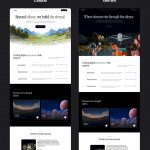
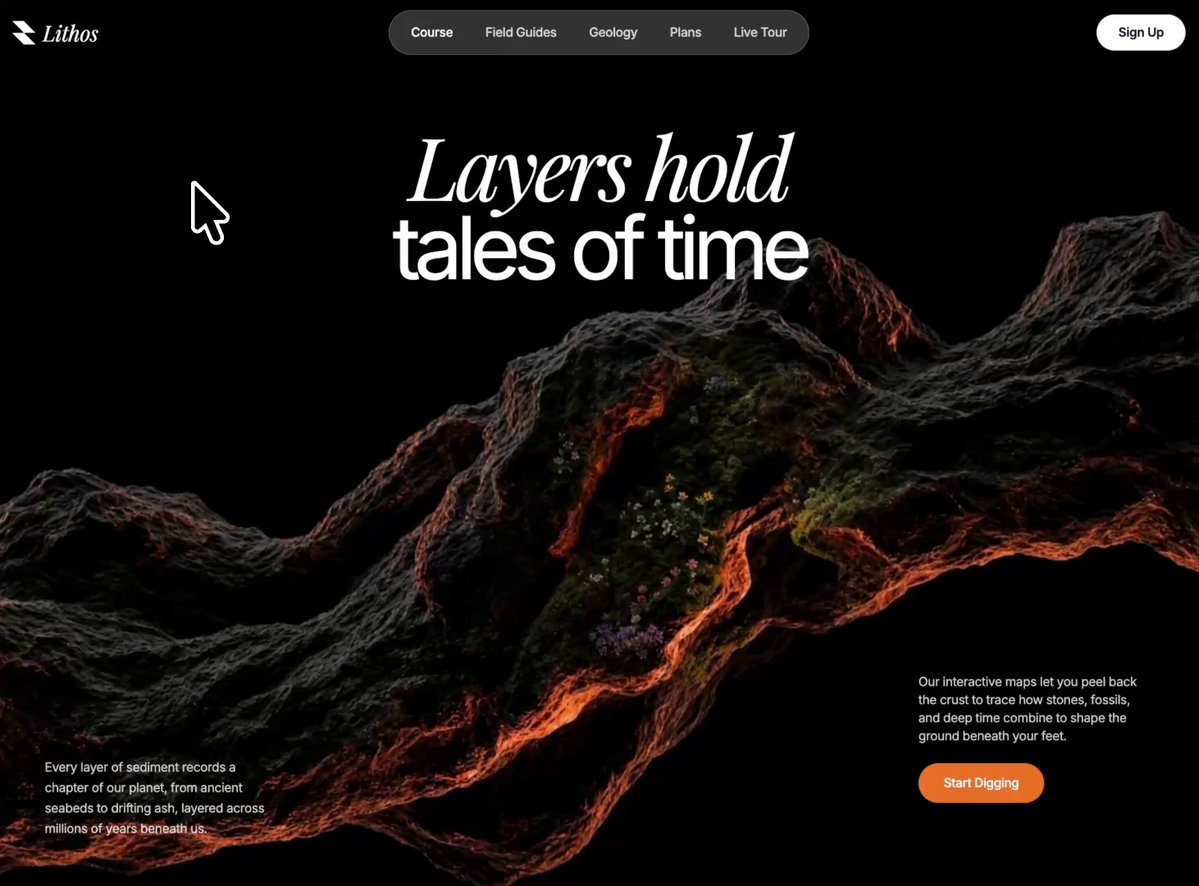
用 React 18 + TypeScript + Vite + Tailwind CSS 和 lucide-react 图标,为一个名为 Lithos 的地质品牌构建一个全屏深色主题 Hero 区域。招牌功能是一个跟随光标的聚光灯效果,通过一个柔和的圆形遮罩,在底图之上揭示出第二张图片。请精确匹配以下每一处细节。
### 字体
在 `src/index.css` 顶部加入以下内容,然后写 `@tailwind base/components/utilities`:
```css
@import url('');
* { font-family: 'Inter', sans-serif; }
.font-playfair { font-family: 'Playfair Display', serif; }
```
- 正文 / UI 字体:**Inter**。
- 展示 / 品牌字标强调:**Playfair Display,斜体**。
### 资源 URL(精确使用以下地址)
- 底图(`BG_IMAGE_1`):
``
- 揭示图(`BG_IMAGE_2`):
``
### 布局与结构
根容器:`min-h-screen bg-white tracking-[-0.02em]`,内联样式 `fontFamily: "'Inter', sans-serif"`。
**版块**(`<section>`):`relative w-full overflow-hidden h-screen bg-black`,内联样式 `style={{ height: '100dvh' }}`。按 z-index 分层:
1. **底图**(`z-10`):`absolute inset-0 bg-center bg-cover bg-no-repeat`,背景为 `BG_IMAGE_1`。
2. **揭示层**(`z-30`):一个 `RevealLayer` 组件(见下),展示 `BG_IMAGE_2`。
3. **标题**(`z-50`):`absolute top-[14%] left-0 right-0 flex flex-col items-center text-center px-5 pointer-events-none`。一个 `<h1>`,`text-white leading-[0.95]`,包含两个块级 span:
- 第一行:`block font-playfair italic font-normal text-5xl sm:text-7xl md:text-8xl`,内联 `letterSpacing: '-0.05em'`,文字为 **「Layers hold」**。
- 第二行:`block font-normal text-5xl sm:text-7xl md:text-8xl -mt-1`,内联 `letterSpacing: '-0.08em'`,文字为 **「tales of time」**。
4. **左下段落**(`z-50`):`hidden sm:block absolute bottom-14 left-10 md:left-14 max-w-[260px]`。`<p className="text-sm text-white/80 leading-relaxed">` —— 「Every layer of sediment records a chapter of our planet, from ancient seabeds to drifting ash, layered across millions of years beneath us.」
5. **右下区块**(`z-50`):`absolute bottom-10 sm:bottom-24 left-5 right-5 sm:left-auto sm:right-10 md:right-14 max-w-full sm:max-w-[260px] flex flex-col items-start gap-4 sm:gap-5`。包含一个 `<p className="text-xs sm:text-sm text-white/80 leading-relaxed">` —— 「Our interactive maps let you peel back the crust to trace how stones, fossils, and deep time combine to shape the ground beneath your feet.」—— 以及一个 **Start Digging** 按钮:`bg-[#e8702a] hover:bg-[#d2611f] text-white text-sm font-medium px-7 py-3 rounded-full transition-all hover:scale-[1.03] active:scale-95 hover:shadow-lg hover:shadow-[#e8702a]/30`。
### 光标聚光灯揭示效果(核心机制)
在父组件中,定义 `const SPOTLIGHT_R = 260;`,并用平滑处理追踪鼠标位置:
- Refs:`mouse`(原始值)、`smooth`(缓动值)、`rafRef`;状态 `cursorPos`(初始为 `{x:-999,y:-999}`)。
- `mousemove` 监听器存储原始的 `e.clientX/clientY`。
- 一个 `requestAnimationFrame` 循环做插值:`smooth.x += (mouse.x - smooth.x) * 0.1`(y 同理),然后 `setCursorPos`。组件卸载时清理监听器并取消 RAF。
`RevealLayer({ image, cursorX, cursorY })`:
- 内部持有一个隐藏的 `<canvas>`(`absolute inset-0 pointer-events-none`,`style={{display:'none'}}`),挂载和窗口调整大小时设置为 `window.innerWidth/Height`。
- 一个揭示用的 `<div>`(`absolute inset-0 bg-center bg-cover bg-no-repeat z-30 pointer-events-none`),背景为揭示图片。
- 每次渲染时:清空 canvas,在 `(cursorX, cursorY)` 处构建一个半径从 0 到 `SPOTLIGHT_R` 的**放射状渐变**,色标为:
`0 → rgba(255,255,255,1)`,`0.4 → 1`,`0.6 → 0.75`,`0.75 → 0.4`,`0.88 → 0.12`,`1 → 0`。
用它填充一个半径为 `SPOTLIGHT_R` 的圆弧。然后调用 `canvas.toDataURL()`,将其应用为揭示层 div 上的 `maskImage` / `webkitMaskImage`,配 `maskSize: '100% 100%'`。这让第二张图片只在跟随光标移动的柔和发光圆圈内可见。
### 导航(固定,覆盖在 Hero 之上)
`<nav className="fixed top-0 left-0 right-0 z-[100] flex items-center justify-between p-4 sm:p-5">`:
- **左侧**:一个内联 SVG Logo(26×26,viewBox `0 0 256 256`,`fill="#ffffff"`,路径 `M 256 256 L 128 256 L 0 128 L 128 128 Z M 256 128 L 128 128 L 0 0 L 128 0 Z`)加品牌字标 `<span className="text-white text-2xl font-playfair italic">Lithos</span>`。
- **中间药丸**(`hidden md:flex absolute left-1/2 -translate-x-1/2 bg-white/20 backdrop-blur-md border border-white/30 rounded-full px-2 py-2 items-center gap-1`):按钮 **Course**(当前项:全白色文字),然后是 **Field Guides、Geology、Plans、Live Tour**(`text-white/80 ... hover:bg-white/20 hover:text-white transition-colors`,`px-4 py-1.5 rounded-full text-sm font-medium`)。
- **右侧(桌面端)**:`hidden md:block bg-white text-gray-900 text-sm font-semibold px-6 py-2.5 rounded-full hover:bg-gray-100` —— **Sign Up**。
### 动画(高级感,加载时触发)
加入到 `index.css`:
```css
@keyframes heroReveal { 0%{opacity:0;transform:translateY(28px);filter:blur(12px)} 100%{opacity:1;transform:translateY(0);filter:blur(0)} }
@keyframes heroFadeUp { 0%{opacity:0;transform:translateY(20px)} 100%{opacity:1;transform:translateY(0)} }
@keyframes heroZoom { 0%{transform:scale(1.12)} 100%{transform:scale(1)} }
.hero-anim { opacity:0; animation-fill-mode:forwards; animation-timing-function:cubic-bezier(0.16,1,0.3,1); }
.hero-reveal { animation-name:heroReveal; animation-duration:1.1s; }
.hero-fade { animation-name:heroFadeUp; animation-duration:1s; }
.hero-zoom { animation:heroZoom 1.8s cubic-bezier(0.16,1,0.3,1) forwards; }
@media (prefers-reduced-motion: reduce){ .hero-anim,.hero-zoom{ animation:none; opacity:1; } }
```
应用方式:
- 底图 div → 加入 `hero-zoom`(缓慢的肯·伯恩斯式缩小推镜)。
- 标题第一行 → `hero-anim hero-reveal`,内联 `animationDelay: '0.25s'`;第二行 → 相同类名,`'0.42s'`(模糊上升,交错出现)。
- 左下段落容器 → `hero-anim hero-fade`,`animationDelay: '0.7s'`。
- 右下容器 → `hero-anim hero-fade`,`animationDelay: '0.85s'`。
### 响应式
- 标题字号从 `text-5xl` → `sm:text-7xl` → `md:text-8xl` 递增。
- 中间导航药丸和桌面端 Sign Up 在 `md` 以下 `hidden`;移动端汉堡菜单为 `md:hidden`。
- 左下段落 `hidden sm:block`;右下区块在移动端全宽(`left-5 right-5`),从 `sm` 起靠右锚定。
- 使用 `100dvh`,避免移动端浏览器工具栏裁切该版块。原文提示词(English)
❤️🔥Access ALL prompts for stunning animated websites in one click:
http://
Build a full-screen, dark-themed hero section for a geology brand called **Lithos**, using **React 18 + TypeScript + Vite + Tailwind CSS** and **lucide-react** for icons. The signature feature is a **cursor-following spotlight that reveals a second image** through a soft circular mask on top of a base image. Match every detail below exactly.
### Fonts
Add this to the top of `src/index.css`, then `@tailwind base/components/utilities`:
```css
@import url('');
* { font-family: 'Inter', sans-serif; }
.font-playfair { font-family: 'Playfair Display', serif; }
```
- Body/UI font: **Inter**.
- Display/wordmark accent: **Playfair Display, italic**.
### Asset URLs (use these exactly)
- Base image (`BG_IMAGE_1`):
``
- Reveal image (`BG_IMAGE_2`):
``
### Layout & structure
Root wrapper: `min-h-screen bg-white tracking-[-0.02em]`, inline `fontFamily: "'Inter', sans-serif"`.
**Section** (`<section>`): `relative w-full overflow-hidden h-screen bg-black`, inline `style={{ height: '100dvh' }}`. Layers, by z-index:
1. **Base image** (`z-10`): `absolute inset-0 bg-center bg-cover bg-no-repeat`, background = `BG_IMAGE_1`.
2. **Reveal layer** (`z-30`): a `RevealLayer` component (see below) showing `BG_IMAGE_2`.
3. **Heading** (`z-50`): `absolute top-[14%] left-0 right-0 flex flex-col items-center text-center px-5 pointer-events-none`. An `<h1>` with `text-white leading-[0.95]` containing two block spans:
- Line 1: `block font-playfair italic font-normal text-5xl sm:text-7xl md:text-8xl`, inline `letterSpacing: '-0.05em'`, text **"Layers hold"**.
- Line 2: `block font-normal text-5xl sm:text-7xl md:text-8xl -mt-1`, inline `letterSpacing: '-0.08em'`, text **"tales of time"**.
4. **Bottom-left paragraph** (`z-50`): `hidden sm:block absolute bottom-14 left-10 md:left-14 max-w-[260px]`. `<p className="text-sm text-white/80 leading-relaxed">` — "Every layer of sediment records a chapter of our planet, from ancient seabeds to drifting ash, layered across millions of years beneath us."
5. **Bottom-right block** (`z-50`): `absolute bottom-10 sm:bottom-24 left-5 right-5 sm:left-auto sm:right-10 md:right-14 max-w-full sm:max-w-[260px] flex flex-col items-start gap-4 sm:gap-5`. Contains a `<p className="text-xs sm:text-sm text-white/80 leading-relaxed">` — "Our interactive maps let you peel back the crust to trace how stones, fossils, and deep time combine to shape the ground beneath your feet." — and a **Start Digging** button: `bg-[#e8702a] hover:bg-[#d2611f] text-white text-sm font-medium px-7 py-3 rounded-full transition-all hover:scale-[1.03] active:scale-95 hover:shadow-lg hover:shadow-[#e8702a]/30`.
### The cursor spotlight reveal (core mechanic)
In the parent, define `const SPOTLIGHT_R = 260;` and track the mouse with smoothing:
- Refs: `mouse` (raw), `smooth` (eased), `rafRef`; state `cursorPos` (init `{x:-999,y:-999}`).
- `mousemove` listener stores raw `e.clientX/clientY`.
- A `requestAnimationFrame` loop lerps: `smooth.x += (mouse.x - smooth.x) * 0.1` (same for y), then `setCursorPos`. Clean up listener + cancel RAF on unmount.
`RevealLayer({ image, cursorX, cursorY })`:
- Holds a hidden `<canvas>` (`absolute inset-0 pointer-events-none`, `style={{display:'none'}}`) sized to `window.innerWidth/Height` on mount + resize.
- A reveal `<div>` (`absolute inset-0 bg-center bg-cover bg-no-repeat z-30 pointer-events-none`) with the reveal image as background.
- On every render: clear canvas, build a **radial gradient** at `(cursorX, cursorY)` from radius 0 → `SPOTLIGHT_R` with stops:
`0 → rgba(255,255,255,1)`, `0.4 → 1`, `0.6 → 0.75`, `0.75 → 0.4`, `0.88 → 0.12`, `1 → 0`.
Fill an arc of radius `SPOTLIGHT_R` with it. Then `canvas.toDataURL()` and apply it as `maskImage`/`webkitMaskImage` on the reveal div with `maskSize: '100% 100%'`. This makes the second image visible only inside the soft glowing circle that trails the cursor.
### Navigation (fixed, over hero)
`<nav className="fixed top-0 left-0 right-0 z-[100] flex items-center justify-between p-4 sm:p-5">`:
- **Left**: an inline SVG logo (26×26, viewBox `0 0 256 256`, `fill="#ffffff"`, path `M 256 256 L 128 256 L 0 128 L 128 128 Z M 256 128 L 128 128 L 0 0 L 128 0 Z`) + wordmark `<span className="text-white text-2xl font-playfair italic">Lithos</span>`.
- **Center pill** (`hidden md:flex absolute left-1/2 -translate-x-1/2 bg-white/20 backdrop-blur-md border border-white/30 rounded-full px-2 py-2 items-center gap-1`): buttons **Course** (active: full white text), then **Field Guides, Geology, Plans, Live Tour** (`text-white/80 ... hover:bg-white/20 hover:text-white transition-colors`, `px-4 py-1.5 rounded-full text-sm font-medium`).
- **Right (desktop)**: `hidden md:block bg-white text-gray-900 text-sm font-semibold px-6 py-2.5 rounded-full hover:bg-gray-100` — **Sign Up**.
### Animations (premium, on load)
Add to `index.css`:
```css
@keyframes heroReveal { 0%{opacity:0;transform:translateY(28px);filter:blur(12px)} 100%{opacity:1;transform:translateY(0);filter:blur(0)} }
@keyframes heroFadeUp { 0%{opacity:0;transform:translateY(20px)} 100%{opacity:1;transform:translateY(0)} }
@keyframes heroZoom { 0%{transform:scale(1.12)} 100%{transform:scale(1)} }
.hero-anim { opacity:0; animation-fill-mode:forwards; animation-timing-function:cubic-bezier(0.16,1,0.3,1); }
.hero-reveal { animation-name:heroReveal; animation-duration:1.1s; }
.hero-fade { animation-name:heroFadeUp; animation-duration:1s; }
.hero-zoom { animation:heroZoom 1.8s cubic-bezier(0.16,1,0.3,1) forwards; }
@media (prefers-reduced-motion: reduce){ .hero-anim,.hero-zoom{ animation:none; opacity:1; } }
```
Apply:
- Base image div → add `hero-zoom` (slow Ken Burns zoom-out).
- Heading line 1 → `hero-anim hero-reveal`, inline `animationDelay: '0.25s'`; line 2 → same with `'0.42s'` (blur-rise, staggered).
- Bottom-left paragraph wrapper → `hero-anim hero-fade`, `animationDelay: '0.7s'`.
- Bottom-right wrapper → `hero-anim hero-fade`, `animationDelay: '0.85s'`.
### Responsiveness
- Heading scales `text-5xl` → `sm:text-7xl` → `md:text-8xl`.
- Center nav pill and desktop Sign Up are `hidden` below `md`; the mobile hamburger is `md:hidden`.
- Bottom-left paragraph is `hidden sm:block`; bottom-right block is full-width on mobile (`left-5 right-5`) and right-anchored from `sm`.
- Use `100dvh` so mobile browser chrome doesn't clip the section.建议模型
Claude Mythos / GPT-5.6 Sol
视频地址
https://media.goodcase.ai/media/video/claude-mythos-lithos-hero-df0603661e88.mp4