



























提示词
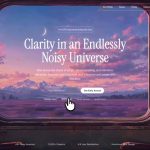
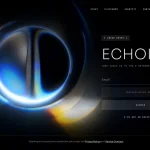
**在 Vite + React + TypeScript + Tailwind CSS 项目中构建一个全屏 hero section。使用 `gsap` 和 `lucide-react`。不要使用其他 UI 库。**

### 字体(位于 `src/index.css`)
在 index.css 顶部、`
@tailwind
` 指令之前导入:
```css
@import
 url('https://fonts.googleapis.com/css2?family=Instrument+Serif:ital@0;1&family=Barlow:wght@300;400;500;600&display=swap');

@font
-face {
  font-family: 'Dirtyline';
  src: url('https://fonts.cdnfonts.com/s/15011/Dirtyline36DaysofType.woff') format('woff');
  font-weight: normal;
  font-style: normal;
  font-display: swap;
}
```
Body 字体:`'Barlow', sans-serif`,背景:`#000`。

### Tailwind 配置(`tailwind.config.js`)
```js
theme: {
  extend: {
    fontFamily: {
      heading: ['Instrument Serif', 'serif'],
      body: ['Barlow', 'sans-serif'],
      dirtyline: ['Dirtyline', 'sans-serif'],
    },
    borderRadius: { DEFAULT: '9999px' },
  },
},
```

### CSS(追加到 `src/index.css`)
```css
.liquid-glass {
  background: rgba(255,255,255,0.01);
  background-blend-mode: luminosity;
  backdrop-filter: blur(4px);
  -webkit-backdrop-filter: blur(4px);
  border: none;
  box-shadow: inset 0 1px 1px rgba(255,255,255,0.1);
  position: relative;
  overflow: hidden;
}
.liquid-glass::before {
  content: "";
  position: absolute; inset: 0;
  border-radius: inherit;
  padding: 1.4px;
  background: linear-gradient(180deg,
    rgba(255,255,255,0.45) 0%,
    rgba(255,255,255,0.15) 20%,
    rgba(255,255,255,0)    40%,
    rgba(255,255,255,0)    60%,
    rgba(255,255,255,0.15) 80%,
    rgba(255,255,255,0.45) 100%);
  -webkit-mask: linear-gradient(#fff 0 0) content-box, linear-gradient(#fff 0 0);
  -webkit-mask-composite: xor;
  mask-composite: exclude;
  pointer-events: none;
}

.liquid-glass-strong {
  background: rgba(255,255,255,0.01);
  background-blend-mode: luminosity;
  backdrop-filter: blur(50px);
  -webkit-backdrop-filter: blur(50px);
  border: none;
  box-shadow: 4px 4px 4px rgba(0,0,0,0.05), inset 0 1px 1px rgba(255,255,255,0.15);
  position: relative;
  overflow: hidden;
}
.liquid-glass-strong::before {
  content: "";
  position: absolute; inset: 0;
  border-radius: inherit;
  padding: 1.4px;
  background: linear-gradient(180deg,
    rgba(255,255,255,0.5) 0%,
    rgba(255,255,255,0.2) 20%,
    rgba(255,255,255,0)   40%,
    rgba(255,255,255,0)   60%,
    rgba(255,255,255,0.2) 80%,
    rgba(255,255,255,0.5) 100%);
  -webkit-mask: linear-gradient(#fff 0 0) content-box, linear-gradient(#fff 0 0);
  -webkit-mask-composite: xor;
  mask-composite: exclude;
  pointer-events: none;
}

.hero-title {
  font-family: 'Instrument Serif', serif;
  font-style: italic;
  font-size: clamp(96px, 18vw, 280px);
  line-height: 0.92;
  letter-spacing: -0.02em;
  color: white;
  text-align: center;
}
```

### 组件(`src/App.tsx`)

**常量:**
- `NAV_LINKS = ['Gallery', 'Styles', 'API', 'Pricing', 'Blog']`
- `VIDEO_SRC = 'https://d8j0ntlcm91z4.cloudfront.net/user_38xzZboKViGWJOttwIXH07lWA1P/hf_20260511_080827_a9e5ad52-b6ee-4e79-b393-d936f179cfd7.mp4'`

**LogoMark** — inline SVG,44x26,viewBox `0 0 44 26`,包含三个白色 rect,x=0/16/30,y=3,宽度分别为 14/12/14,高度为 20,rx=3。

**状态/引用:**
- `mounted`(boolean,在挂载 effect 中设为 true,用于淡入)。
- `videoRef`(HTMLVideoElement)、`videoBgRef`(HTMLDivElement)、`displayCanvasRef`(HTMLCanvasElement)。
- `framesReady` boolean 状态,`framesRef` = `useRef<HTMLCanvasElement[]>([])`。

**Effect 1 — 帧捕获(boomerang 设置):**
- 挂载时获取 `videoRef.current`。设置 `capturing = true`、`lastTime = -1`、`MAX_WIDTH = 960`、`frames: HTMLCanvasElement[] = []`。
- `captureFrame()`:如果 `!capturing`、`readyState < 2` 或 `currentTime === lastTime`,则直接返回。更新 `lastTime`。Scale = `min(1, 960/videoWidth)`。创建尺寸为缩放后 w/h 的 offscreen canvas,执行 `ctx.drawImage(video, 0, 0, w, h)`,然后推入 frames。
- 可用时使用 `requestVideoFrameCallback`,否则使用 `requestAnimationFrame` fallback。
- 在 `loadedmetadata` 时:调用 `http://video.play().catch(()=>{})`,然后启动捕获循环。
- 在 `ended` 时:设置 `capturing = false`,将 frames 存入 `framesRef.current`,并执行 `setFramesReady(true)`。
- 如果 `readyState >= 1`,立即调用 `onLoaded()`。
- 清理:取消 raf 并移除监听器。

**Effect 2 — Boomerang 渲染:**
- 当 `framesReady` 为 true 时,获取 `displayCanvasRef`,根据 `frames[0]` 设置其 `width/height`。
- 变量:`index = 0`、`direction = 1`、`last = http://performance.now()`、`interval = 1000/30`。
- 在 `requestAnimationFrame(render)` 循环中:如果 `now - last >= interval`,绘制 `frames[index]`,然后执行 `index += direction`。当 `index >= frames.length - 1` 时,将其限制在边界并切换为 `-1`。当 `index <= 0` 时,将其限制在边界并切换为 `+1`。
- 清理:cancelAnimationFrame。

**Effect 3 — 视差鼠标追踪(gsap):**
- `strength = 20`。追踪 `targetX/Y`,每帧通过 `currentX/Y += (target - current) * 0.06` 平滑 lerp。
- 在 `mousemove` 时:`targetX = ((clientX - cx)/cx) * strength`(Y 同理)。
- 每帧执行:`gsap.set(videoBgRef.current, { x: currentX, y: currentY })`。

**JSX 结构:**
根节点:`<div className="min-h-screen bg-black text-white font-body overflow-x-hidden">`

1. **视频背景层:** `<div ref={videoBgRef} className="fixed top-0 left-0 w-full h-full z-0 scale-[1.08] origin-center">`,其中包含:
   - `<video>`,设置 `src={VIDEO_SRC}`、`muted`、`playsInline`、`preload="auto"`、`crossOrigin="anonymous"`、`className="w-full h-full object-cover"`、`style={{ display: framesReady ? 'none' : 'block' }}`。
   - `<canvas ref={displayCanvasRef} className="w-full h-full object-cover" style={{ display: framesReady ? 'block' : 'none' }}>`。

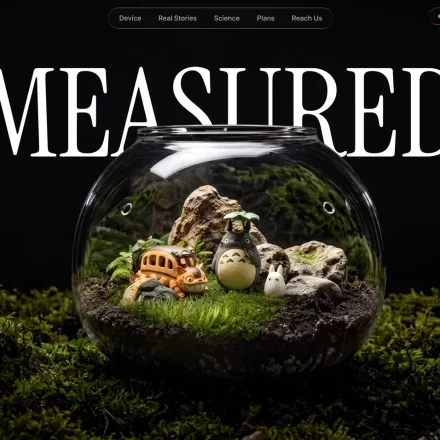
2. **Hero 标题:** fixed div,`left-0 right-0 z-20 w-full px-4`,`style={{ top: '126px' }}`,根据 `mounted`,通过 `transition-all duration-1000` 在 `opacity-100 translate-y-0` 与 `opacity-0 translate-y-6` 之间切换,实现淡入。内部:`<h1 className="hero-title select-none">MicroVisuals</h1>`。

3. **导航:** `<nav className="fixed top-5 left-1/2 -translate-x-1/2 z-50 whitespace-nowrap">`,其中包含一个 `liquid-glass flex items-center gap-6 rounded px-4 py-2.5` pill:
   - `<LogoMark />`
   - `<div className="flex items-center gap-5">`,将 `NAV_LINKS` 渲染为 `<a>`,类为 `text-sm font-body font-light text-white/70 hover:text-white transition-colors duration-200`。
   - 右侧组合 `flex items-center gap-3 ml-4`:"Sign in" 链接(样式相同),然后是 "Try it free",使用 `liquid-glass-strong text-sm font-body font-medium text-white rounded px-4 py-1.5 transition-all duration-200 hover:scale-[1.04] hover:shadow-[0_0_16px_2px_rgba(255,255,255,0.12)] active:scale-[0.97]`。

4. **底部行:** fixed,`bottom-12 left-0 right-0 px-10 flex items-end justify-between z-20`,使用 `transition-all duration-1000 delay-300` 淡入。
   - 左侧 `<p>`:`text-sm font-body font-light text-white/75 max-w-[220px] leading-relaxed`,文本:"Forma 的 AI 像创意总监一样理解语境、构图和风格。"
   - 居中的 absolute 容器 `left-1/2 -translate-x-1/2 bottom-0 flex items-center gap-3`,包含两个按钮:
     - 主按钮:`group relative bg-white text-black text-sm font-body font-medium rounded px-6 py-3 overflow-hidden active:scale-[0.97] transition-all duration-200 shadow-[0_0_0_0_rgba(255,255,255,0)] hover:shadow-[0_0_24px_4px_rgba(255,255,255,0.25)] hover:scale-[1.03]`。内容:`<span className="relative z-10">开始生成</span>` + overlay `<span className="absolute inset-0 bg-gradient-to-b from-white to-white/85 opacity-0 group-hover:opacity-100 transition-opacity duration-200" />`。
     - 次按钮:`liquid-glass group text-white text-sm font-body font-medium rounded px-6 py-3 active:scale-[0.97] transition-all duration-200 hover:scale-[1.03] hover:shadow-[inset_0_1px_1px_rgba(255,255,255,0.2),0_0_20px_2px_rgba(255,255,255,0.07)]` — 标签 "查看模板"。
   - 右侧 `<p>`:类与左侧相同,另加 `text-right`,文本:"描述你脑海中的画面——获得真正符合想象的图像。"

### 注意事项
- Tailwind 默认 border-radius 被覆盖为 `9999px`(完整 pill)——markup 中的每个 `rounded` 都会生成 pill corners。
- 不要使用 `video.currentTime` 进行反向播放——boomerang 仅使用捕获的 `frames[]` 数组。
- video element 保持 mounted(`framesReady` 后隐藏),以便 canvas 持续绘制 snapshots。
原文提示词(English)
**Build a fullscreen hero section in a Vite + React + TypeScript + Tailwind CSS project. Use `gsap` and `lucide-react`. No other UI libraries.**

### Fonts (in `src/index.css`)
Import at the top of index.css BEFORE `
@tailwind
` directives:
```css
@import
 url('https://fonts.googleapis.com/css2?family=Instrument+Serif:ital@0;1&family=Barlow:wght@300;400;500;600&display=swap');

@font
-face {
  font-family: 'Dirtyline';
  src: url('https://fonts.cdnfonts.com/s/15011/Dirtyline36DaysofType.woff') format('woff');
  font-weight: normal;
  font-style: normal;
  font-display: swap;
}
```
Body font: `'Barlow', sans-serif`, background `#000`.

### Tailwind config (`tailwind.config.js`)
```js
theme: {
  extend: {
    fontFamily: {
      heading: ['Instrument Serif', 'serif'],
      body: ['Barlow', 'sans-serif'],
      dirtyline: ['Dirtyline', 'sans-serif'],
    },
    borderRadius: { DEFAULT: '9999px' },
  },
},
```

### CSS (append to `src/index.css`)
```css
.liquid-glass {
  background: rgba(255,255,255,0.01);
  background-blend-mode: luminosity;
  backdrop-filter: blur(4px);
  -webkit-backdrop-filter: blur(4px);
  border: none;
  box-shadow: inset 0 1px 1px rgba(255,255,255,0.1);
  position: relative;
  overflow: hidden;
}
.liquid-glass::before {
  content: "";
  position: absolute; inset: 0;
  border-radius: inherit;
  padding: 1.4px;
  background: linear-gradient(180deg,
    rgba(255,255,255,0.45) 0%,
    rgba(255,255,255,0.15) 20%,
    rgba(255,255,255,0)    40%,
    rgba(255,255,255,0)    60%,
    rgba(255,255,255,0.15) 80%,
    rgba(255,255,255,0.45) 100%);
  -webkit-mask: linear-gradient(#fff 0 0) content-box, linear-gradient(#fff 0 0);
  -webkit-mask-composite: xor;
  mask-composite: exclude;
  pointer-events: none;
}

.liquid-glass-strong {
  background: rgba(255,255,255,0.01);
  background-blend-mode: luminosity;
  backdrop-filter: blur(50px);
  -webkit-backdrop-filter: blur(50px);
  border: none;
  box-shadow: 4px 4px 4px rgba(0,0,0,0.05), inset 0 1px 1px rgba(255,255,255,0.15);
  position: relative;
  overflow: hidden;
}
.liquid-glass-strong::before {
  content: "";
  position: absolute; inset: 0;
  border-radius: inherit;
  padding: 1.4px;
  background: linear-gradient(180deg,
    rgba(255,255,255,0.5) 0%,
    rgba(255,255,255,0.2) 20%,
    rgba(255,255,255,0)   40%,
    rgba(255,255,255,0)   60%,
    rgba(255,255,255,0.2) 80%,
    rgba(255,255,255,0.5) 100%);
  -webkit-mask: linear-gradient(#fff 0 0) content-box, linear-gradient(#fff 0 0);
  -webkit-mask-composite: xor;
  mask-composite: exclude;
  pointer-events: none;
}

.hero-title {
  font-family: 'Instrument Serif', serif;
  font-style: italic;
  font-size: clamp(96px, 18vw, 280px);
  line-height: 0.92;
  letter-spacing: -0.02em;
  color: white;
  text-align: center;
}
```

### Component (`src/App.tsx`)

**Constants:**
- `NAV_LINKS = ['Gallery', 'Styles', 'API', 'Pricing', 'Blog']`
- `VIDEO_SRC = 'https://d8j0ntlcm91z4.cloudfront.net/user_38xzZboKViGWJOttwIXH07lWA1P/hf_20260511_080827_a9e5ad52-b6ee-4e79-b393-d936f179cfd7.mp4'`

**LogoMark** — inline SVG, 44x26, viewBox `0 0 44 26`, three white rects at x=0/16/30, y=3, widths 14/12/14, height 20, rx=3.

**State/refs:**
- `mounted` (boolean, set true in a mount effect for fade-in).
- `videoRef` (HTMLVideoElement), `videoBgRef` (HTMLDivElement), `displayCanvasRef` (HTMLCanvasElement).
- `framesReady` boolean state, `framesRef` = `useRef<HTMLCanvasElement[]>([])`.

**Effect 1 — Frame capture (boomerang setup):**
- On mount, get `videoRef.current`. Set `capturing = true`, `lastTime = -1`, `MAX_WIDTH = 960`, `frames: HTMLCanvasElement[] = []`.
- `captureFrame()`: bail if `!capturing` or `readyState < 2` or `currentTime === lastTime`. Update `lastTime`. Scale = `min(1, 960/videoWidth)`. Create offscreen canvas at scaled w/h, `ctx.drawImage(video, 0, 0, w, h)`, push to frames.
- Use `requestVideoFrameCallback` when available, else `requestAnimationFrame` fallback.
- On `loadedmetadata`: call `http://video.play().catch(()=>{})` then start the capture loop.
- On `ended`: set `capturing = false`, store frames in `framesRef.current`, `setFramesReady(true)`.
- If `readyState >= 1`, invoke `onLoaded()` immediately.
- Cleanup: cancel raf + remove listeners.

**Effect 2 — Boomerang render:**
- When `framesReady` true, grab `displayCanvasRef`, set its `width/height` from `frames[0]`.
- Variables: `index = 0`, `direction = 1`, `last = http://performance.now()`, `interval = 1000/30`.
- In an `requestAnimationFrame(render)` loop: if `now - last >= interval`, draw `frames[index]`, advance `index += direction`. When `index >= frames.length - 1`, clamp and flip to `-1`. When `index <= 0`, clamp and flip to `+1`.
- Cleanup: cancelAnimationFrame.

**Effect 3 — Parallax mouse tracking (gsap):**
- `strength = 20`. Track `targetX/Y`, smoothly lerp `currentX/Y += (target - current) * 0.06` each frame.
- On `mousemove`: `targetX = ((clientX - cx)/cx) * strength` (same for Y).
- Each frame: `gsap.set(videoBgRef.current, { x: currentX, y: currentY })`.

**JSX structure:**
Root: `<div className="min-h-screen bg-black text-white font-body overflow-x-hidden">`

1. **Video background layer:** `<div ref={videoBgRef} className="fixed top-0 left-0 w-full h-full z-0 scale-[1.08] origin-center">` containing:
   - `<video>` with `src={VIDEO_SRC}`, `muted`, `playsInline`, `preload="auto"`, `crossOrigin="anonymous"`, `className="w-full h-full object-cover"`, `style={{ display: framesReady ? 'none' : 'block' }}`.
   - `<canvas ref={displayCanvasRef} className="w-full h-full object-cover" style={{ display: framesReady ? 'block' : 'none' }}>`.

2. **Hero title:** fixed div, `left-0 right-0 z-20 w-full px-4`, `style={{ top: '126px' }}`, fades in via `transition-all duration-1000` toggling `opacity-100 translate-y-0` vs `opacity-0 translate-y-6` based on `mounted`. Inside: `<h1 className="hero-title select-none">MicroVisuals</h1>`.

3. **Nav:** `<nav className="fixed top-5 left-1/2 -translate-x-1/2 z-50 whitespace-nowrap">` containing a `liquid-glass flex items-center gap-6 rounded px-4 py-2.5` pill:
   - `<LogoMark />`
   - `<div className="flex items-center gap-5">` of `NAV_LINKS` as `<a>` with classes `text-sm font-body font-light text-white/70 hover:text-white transition-colors duration-200`.
   - Right cluster `flex items-center gap-3 ml-4`: "Sign in" link (same style), then "Try it free" with `liquid-glass-strong text-sm font-body font-medium text-white rounded px-4 py-1.5 transition-all duration-200 hover:scale-[1.04] hover:shadow-[0_0_16px_2px_rgba(255,255,255,0.12)] active:scale-[0.97]`.

4. **Bottom row:** fixed, `bottom-12 left-0 right-0 px-10 flex items-end justify-between z-20`, fade-in with `transition-all duration-1000 delay-300`.
   - Left `<p>`: `text-sm font-body font-light text-white/75 max-w-[220px] leading-relaxed`, text: "Forma's AI understands context, composition, and style like a creative director would."
   - Center absolute `left-1/2 -translate-x-1/2 bottom-0 flex items-center gap-3` with two buttons:
     - Primary: `group relative bg-white text-black text-sm font-body font-medium rounded px-6 py-3 overflow-hidden active:scale-[0.97] transition-all duration-200 shadow-[0_0_0_0_rgba(255,255,255,0)] hover:shadow-[0_0_24px_4px_rgba(255,255,255,0.25)] hover:scale-[1.03]`. Contents: `<span className="relative z-10">Start generating</span>` + overlay `<span className="absolute inset-0 bg-gradient-to-b from-white to-white/85 opacity-0 group-hover:opacity-100 transition-opacity duration-200" />`.
     - Secondary: `liquid-glass group text-white text-sm font-body font-medium rounded px-6 py-3 active:scale-[0.97] transition-all duration-200 hover:scale-[1.03] hover:shadow-[inset_0_1px_1px_rgba(255,255,255,0.2),0_0_20px_2px_rgba(255,255,255,0.07)]` — label "See templates".
   - Right `<p>`: same classes as left plus `text-right`, text: "Describe what you see in your head — get images that actually match."

### Notes
- Tailwind default border-radius is overridden to `9999px` (full pill) — every `rounded` in the markup produces pill corners.
- Do NOT use `video.currentTime` to reverse — the boomerang uses the captured `frames[]` array only.
- The video element stays mounted (hidden once `framesReady`) so the canvas keeps drawing snapshots.