














提示词
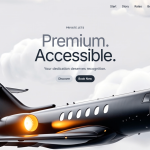
创建一个高端私人飞机落地页首屏区域,规格如下:

视频背景:
使用此确切的 CloudFront 视频 URL:https://d8j0ntlcm91z4.cloudfront.net/user_38xzZboKViGWJOttwIXH07lWA1P/hf_20260328_091828_e240eb17-6edc-4129-ad9d-98678e3fd238.mp4
视频应自动播放、静音、连续循环,并包含 playsInline 属性
视频使用 object-cover 覆盖整个视口(100vh)

导航栏:
左侧显示品牌名称“SkyElite”(text-2xl、font-semibold、text-gray-900)
桌面端菜单项(移动端隐藏,md:flex 时显示):开始、品牌故事、价格、优势、常见问题
导航链接使用 gray-900,并带有 hover:text-gray-700 transition
使用 Lucide React 图标(Menu/X)的移动端汉堡菜单按钮
移动端菜单以白色/95 不透明度背景、背景模糊、圆角和阴影的下拉菜单形式出现
最大宽度为 7xl,居中并使用 px-8 py-6

首屏内容(居中,使用 -mt-80 向上拉):
小号大写标签:“私人飞机”(text-sm、font-semibold、gray-600、tracking-wider、mb-4)
带重叠效果的两行大标题:
第 1 行:“高端。”(text-6xl md:text-7xl lg:text-8xl、font-normal、text-gray-500、leading-none、tracking-tighter)
第 2 行:“触手可及。”(相同字号,颜色:#202A36,使用负上边距 -12px 实现重叠)
副标题:“你的付出值得被认可。”(text-lg md:text-xl、gray-600、mb-6、max-w-2xl)
两个行动号召按钮(gap-4,居中):
“探索”按钮:px-4 py-2、rounded-full、bg-gray-300、text-gray-800、font-medium、hover:bg-gray-400
“立即预订”按钮:px-4 py-2、rounded-full、白色文字、背景色 #202A36、悬停颜色 #1a2229,并带平滑过渡

字体排印:
使用 Inter 字体(从 Google Fonts 导入 400、500、600、700 字重)
通过 CSS 应用于整个 body

技术设置:
React + TypeScript
使用 Tailwind CSS 设置样式
使用 Lucide React 提供图标
使用 useState hook 切换移动端菜单
全屏高度容器(h-screen)
响应式断点:移动优先、md、lg
所有过渡均使用 transition-colors 类

布局结构:
外层容器:min-h-screen、bg-gray-50
首屏区域:relative、h-screen、overflow-hidden
内容包装器:relative、h-full、flex flex-col
主内容区域:flex-1、flex items-center justify-center

整体应简洁、现代且高端,并具有流畅的交互效果。
原文提示词(English)
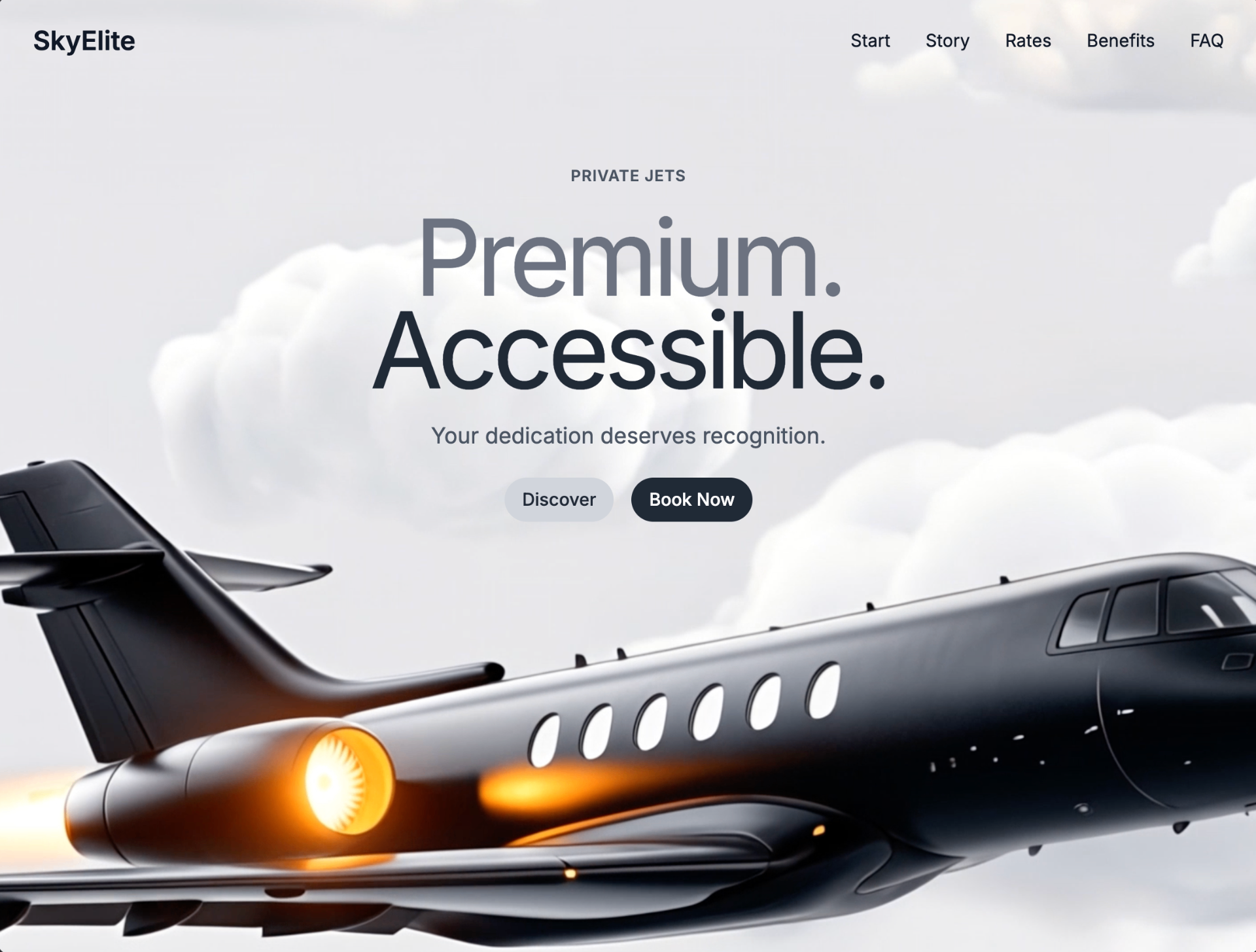
Create a premium private jet landing page hero section with the following specifications:

Video Background:
Use this exact CloudFront video URL: https://d8j0ntlcm91z4.cloudfront.net/user_38xzZboKViGWJOttwIXH07lWA1P/hf_20260328_091828_e240eb17-6edc-4129-ad9d-98678e3fd238.mp4
Video should autoplay, be muted, loop continuously, and include playsInline attribute
Video covers entire viewport (100vh) using object-cover

Navigation Bar:
Brand name "SkyElite" on the left (text-2xl, font-semibold, text-gray-900)
Desktop menu items (hidden on mobile, visible md:flex): Start, Story, Rates, Benefits, FAQ
Navigation links in gray-900 with hover:text-gray-700 transition
Mobile hamburger menu button using Lucide React icons (Menu/X)
Mobile menu appears as dropdown with white/95 opacity background, backdrop blur, rounded corners, shadow
Max width 7xl, centered with px-8 py-6

Hero Content (centered, -mt-80 to pull up):
Small uppercase label: "PRIVATE JETS" (text-sm, font-semibold, gray-600, tracking-wider, mb-4)
Large two-line heading with overlapping effect:
Line 1: "Premium." (text-6xl md:text-7xl lg:text-8xl, font-normal, text-gray-500, leading-none, tracking-tighter)
Line 2: "Accessible." (same size, color: #202A36, negative margin-top: -12px for overlap)
Subtitle: "Your dedication deserves recognition." (text-lg md:text-xl, gray-600, mb-6, max-w-2xl)
Two call-to-action buttons (gap-4, centered):
"Discover" button: px-4 py-2, rounded-full, bg-gray-300, text-gray-800, font-medium, hover:bg-gray-400
"Book Now" button: px-4 py-2, rounded-full, white text, bg-color #202A36, hover color #1a2229 with smooth transitions

Typography:
Use Inter font (import from Google Fonts: 400, 500, 600, 700 weights)
Apply to entire body via CSS

Technical Setup:
React with TypeScript
Tailwind CSS for styling
Lucide React for icons
useState hook for mobile menu toggle
Full screen height container (h-screen)
Responsive breakpoints: mobile-first, md, lg
All transitions use transition-colors class

Layout Structure:
Outer container: min-h-screen, bg-gray-50
Hero section: relative, h-screen, overflow-hidden
Content wrapper: relative, h-full, flex flex-col
Main content area: flex-1, flex items-center justify-center

Make it clean, modern, and premium-looking with smooth interactions.