















































提示词
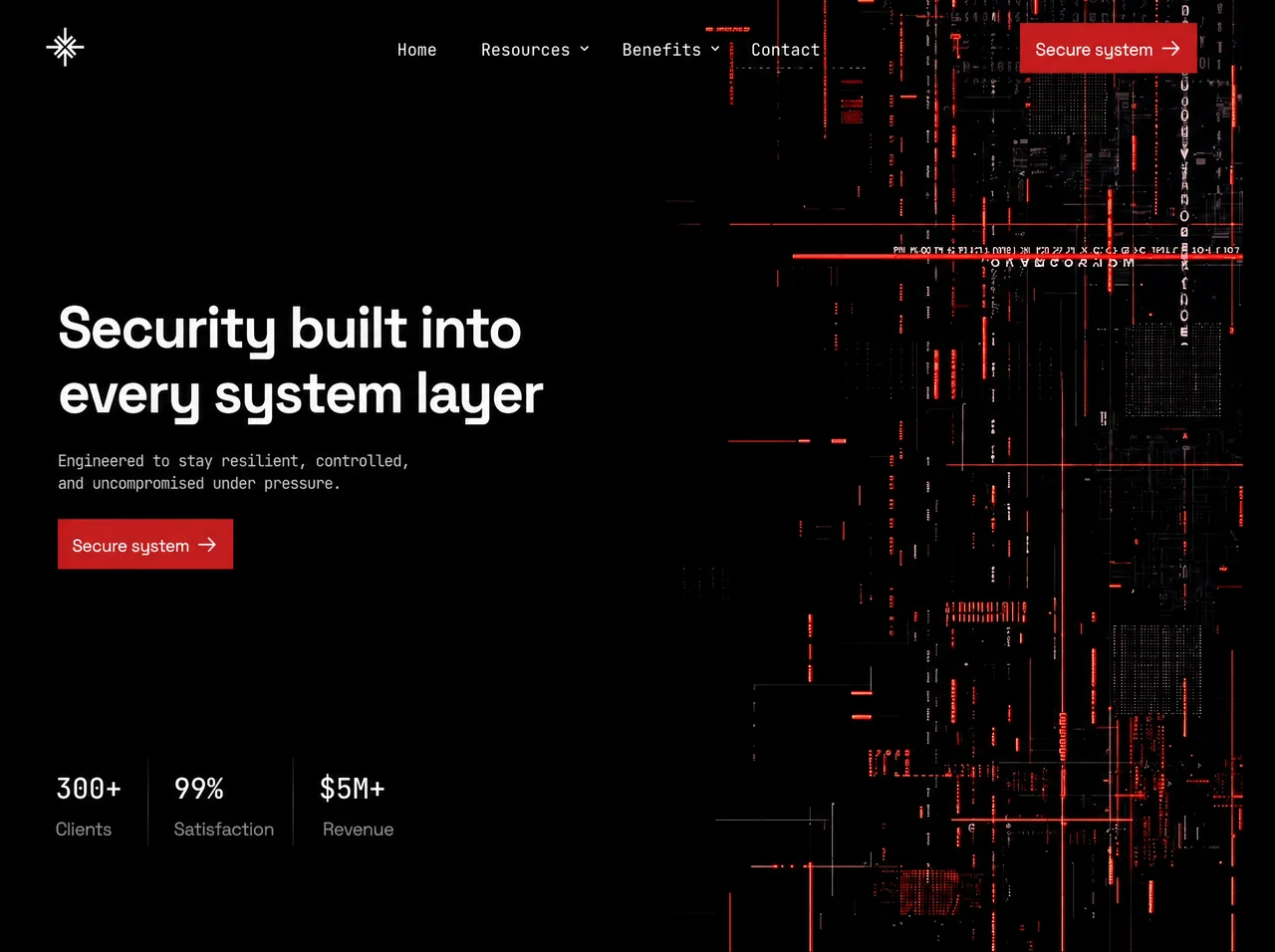
构建一个**单文件、自包含的 `index.html`**,以**像素级精度**复刻这个网络安全落地页。固定全屏黑色舞台、左侧锁定排版、右侧循环视频氛围、一次性入场编排,以及移动端汉堡菜单遮罩层。不使用框架。不可滚动。不使用卡片。不使用紫色。不使用圆角胶囊。
---
## 1. 文档外壳
```html
<!DOCTYPE html>
<html lang="en">
<head>
<meta charset="utf-8">
<meta name="viewport" content="width=device-width, initial-scale=1, viewport-fit=cover">
<title>Security built into every system layer</title>
```
- `html, body { height:100%; background:#000; overflow:hidden }`
- `body { -webkit-font-smoothing:antialiased; text-rendering:geometricPrecision }`
---
## 2. 字体(使用原版的精确别名)
通过 `@font-face` 嵌入两种 WOFF2 字体,并设置 **`font-display:block`**:
| CSS 字体族别名 | 实际字体 | 用途 |
|---|---|---|
| `'SG'` | **Space Grotesk**(原版将 Light 字重嵌入为 `SpaceGrotesk-Light`) | 标题、按钮标签、统计标签、移动端菜单行 |
| `'JB'` | **JetBrains Mono Regular**(`JetBrainsMono-Regular`) | 导航链接、副文案、统计数字、菜单眉题/注释/子链接 |
CSS 字重用法(即使只嵌入一种字重,也要匹配原版声明):
- **SG**:`480`(按钮)、`700`(h1 + 移动端 `.mrow`)、`400`(统计标签)
- **JB**:`400`(导航、副文案、菜单)、`480`(统计数字)
如果不复制原始 base64,最接近的公开替代字体为 Google Fonts **Space Grotesk** + **JetBrains Mono**,仍分别使用 `'SG'` / `'JB'` 作为别名。
---
## 3. 设计变量 / 缩放系统
通过 `--s` 定义三种设计画布:
**Desktop(默认)**
```css
:root {
--s: min(100vw / 1505, 100vh / 700);
--red: #c81b1c;
--ink: #fff;
--sub: #e6e6e6;
--lab: #949494;
--bx:60; --by:36; --bs:44; /* burger box */
--h1y: -12.5;
--suby: 167.5;
--numy: 19;
--laby: 74;
}
```
**Tablet portrait** `@media (max-width:1023px) and (max-aspect-ratio:1/1)`
画布 **900×1200**:
```css
--s: clamp(0.82px, min(100vw / 900, 100vh / 1200), 1.25px);
--bx:56; --by:33; --bs:40;
--h1y:-10.25; --suby:137.4; --numy:15.6; --laby:60.7;
```
**Phone** `@media (max-width:599px)`
画布 **430×620**:
```css
--s: min(100vw / 430, 100vh / 620, 1.02px);
--bx:26; --by:21; --bs:34;
--h1y:-7.1; --suby:108; --numy:13; --laby:50;
```
所有布局值均使用 `calc(N * var(--s))`。不要在该系统之外随意使用 rem/px 布局值。
---
## 4. 背景视频(必须使用精确 URL)
在所有出现 bg plate 的位置使用以下**完全一致的** CloudFront URL:
```
```
使用**三个同步的 `<video>` 实例**,每个实例均包含:
`autoplay muted loop playsinline preload="auto"`
1. `.bg > video` — 主 full-bleed plate
2. `.bg2 > video` — 第二遍处理,提亮下半部分
3. `.menu-tex > video` — 移动端菜单内的淡化遮罩层
CSS:
```css
.screen { position:fixed; inset:0; overflow:hidden; background:#000 }
.bg, .bg2 { position:absolute; inset:0; overflow:hidden; pointer-events:none }
.bg { filter: url(#grade) }
.bg video, .bg2 video {
position:absolute; inset:0; width:100%; height:100%;
object-fit:cover; object-position:center top; display:block;
}
.bg2 {
filter: url(#grade2);
mix-blend-mode: plus-lighter;
opacity: .35;
-webkit-mask-image: linear-gradient(180deg, transparent 21.5%, #000 100%);
mask-image: linear-gradient(180deg, transparent 21.5%, #000 100%);
}
```
**Tablet portrait 视频处理**
- `.bg2 { display:none }`
- `.bg video { object-position:right top; transform:scale(1.18); transform-origin:right top }`
- `.bg` 使用遮罩:`linear-gradient(180deg, #000 0 40%, transparent 64%)`
- 开启 `.scrim`:`linear-gradient(100deg, #000 26%, rgba(0,0,0,.74) 50%, rgba(0,0,0,.18) 76%, transparent 92%)`
**Phone 视频处理**
- 视频使用 `object-position:78% top`
- 再次显示 `.bg2`,并使用遮罩 `linear-gradient(180deg, transparent 10%, #000 60%)`
- 开启垂直 `.scrim`:
`linear-gradient(180deg, rgba(0,0,0,.10) 0%, rgba(0,0,0,.50) 24%, rgba(0,0,0,.86) 42%, #000 66%)`
**视频同步脚本**:master = 第一个视频;在 `timeupdate` 时,如果其他视频漂移 `>0.12s`,将其 `currentTime` 设为 master 的时间。如果 `prefers-reduced-motion: reduce`,暂停全部视频并移除 `autoplay`。
**SVG 调色滤镜**(必需——应用于视频容器):
### `#grade`
```xml
<filter id="grade" color-interpolation-filters="sRGB">
<feComponentTransfer>
<feFuncR type="table" tableValues="0.0018 0.0105 0.0154 0.0228 0.0307 0.0404 0.0485 0.0585 0.0719 0.0923 0.1205 0.1466 0.1657 0.1866 0.2197 0.2405 0.2485 0.2921 0.3362 0.3465 0.3472 0.3781 0.3781 0.4078 0.4199 0.4391 0.4604 0.4763 0.4798 0.5197 0.5473 0.5720 0.5995 0.6048 0.6232 0.6322 0.6483 0.6734 0.7201 0.7201 0.7410 0.7707 0.7707 0.7790 0.8084 0.8084 0.8390 0.8595 0.8707 0.8870 0.8993 0.9085 0.9132 0.9132 0.9162 0.9162 0.9162 0.9162 0.9162 0.9162 0.9162 0.9162 0.9162 0.9238 0.9300"/>
<feFuncG type="table" tableValues="0.0023 0.0106 0.0159 0.0250 0.0333 0.0445 0.0535 0.0620 0.0707 0.0827 0.0936 0.1063 0.1214 0.1402 0.1678 0.1727 0.2029 0.2176 0.2461 0.2757 0.2814 0.3050 0.3415 0.3692 0.3826 0.3884 0.4617 0.4617 0.4617 0.4643 0.4643 0.4808 0.5706 0.6005 0.6005 0.6390 0.6390 0.6390 0.6390 0.6390 0.6390 0.6390 0.6390 0.6390 0.6524 0.6664 0.6805 0.6945 0.7086 0.7227 0.7367 0.7508 0.7648 0.7789 0.7929 0.8070 0.8211 0.8351 0.8492 0.8632 0.8773 0.8913 0.9054 0.9195 0.9300"/>
<feFuncB type="table" tableValues="0.0021 0.0110 0.0187 0.0311 0.0377 0.0466 0.0584 0.0706 0.0791 0.0924 0.1039 0.1145 0.1316 0.1464 0.1614 0.1719 0.1887 0.2014 0.2247 0.2458 0.2954 0.2954 0.3089 0.3938 0.3938 0.3988 0.3988 0.4581 0.4581 0.4762 0.4762 0.4763 0.5374 0.5560 0.5813 0.5813 0.5813 0.5813 0.5835 0.5969 0.6104 0.6238 0.6373 0.6507 0.6642 0.6777 0.6911 0.7046 0.7181 0.7315 0.7449 0.7584 0.7719 0.7853 0.7988 0.8123 0.8257 0.8391 0.8526 0.8661 0.8795 0.8930 0.9065 0.9199 0.9300"/>
</feComponentTransfer>
</filter>
```
### `#grade2`(稍暗的提亮 pass)
```xml
<filter id="grade2" color-interpolation-filters="sRGB">
<feComponentTransfer>
<feFuncR type="table" tableValues="0.0016 0.0092 0.0136 0.0201 0.0270 0.0356 0.0427 0.0515 0.0633 0.0812 0.1060 0.1290 0.1458 0.1642 0.1933 0.2116 0.2187 0.2570 0.2959 0.3049 0.3055 0.3327 0.3327 0.3589 0.3695 0.3864 0.4052 0.4191 0.4222 0.4573 0.4816 0.5034 0.5276 0.5322 0.5484 0.5563 0.5705 0.5926 0.6337 0.6337 0.6521 0.6782 0.6782 0.6855 0.7114 0.7114 0.7383 0.7564 0.7662 0.7806 0.7914 0.7995 0.8036 0.8036 0.8063 0.8063 0.8063 0.8063 0.8063 0.8063 0.8063 0.8063 0.8063 0.8129 0.8184"/>
<feFuncG type="table" tableValues="0.0015 0.0069 0.0103 0.0163 0.0216 0.0289 0.0348 0.0403 0.0460 0.0538 0.0608 0.0691 0.0789 0.0911 0.1091 0.1123 0.1319 0.1414 0.1600 0.1792 0.1829 0.1983 0.2220 0.2400 0.2487 0.2525 0.3001 0.3001 0.3001 0.3018 0.3018 0.3125 0.3709 0.3903 0.3903 0.4153 0.4153 0.4153 0.4153 0.4153 0.4153 0.4153 0.4153 0.4153 0.4241 0.4332 0.4423 0.4514 0.4606 0.4698 0.4789 0.4880 0.4971 0.5063 0.5154 0.5246 0.5337 0.5428 0.5520 0.5611 0.5702 0.5793 0.5885 0.5977 0.6045"/>
<feFuncB type="table" tableValues="0.0013 0.0066 0.0112 0.0187 0.0226 0.0280 0.0350 0.0424 0.0475 0.0554 0.0623 0.0687 0.0790 0.0878 0.0968 0.1031 0.1132 0.1208 0.1348 0.1475 0.1772 0.1772 0.1853 0.2363 0.2363 0.2393 0.2393 0.2749 0.2749 0.2857 0.2857 0.2858 0.3224 0.3336 0.3488 0.3488 0.3488 0.3488 0.3501 0.3581 0.3662 0.3743 0.3824 0.3904 0.3985 0.4066 0.4147 0.4228 0.4309 0.4389 0.4469 0.4550 0.4631 0.4712 0.4793 0.4874 0.4954 0.5035 0.5116 0.5197 0.5277 0.5358 0.5439 0.5519 0.5580"/>
</feComponentTransfer>
</filter>
```
隐藏 defs:`.svgdefs { position:absolute; width:0; height:0; overflow:hidden }`
---
## 5. 精确文案与 DOM 结构
`.screen` 内的图层树:
1. `.bg`(+ video)
2. `.bg2`(+ video)
3. `.scrim`(Desktop 上隐藏)
4. `.frame`(flex column),包含:
- `header`
- spacer `.sp.sp-a`
- `section.hero`
- spacer `.sp.sp-b`
- `section.stats`
- spacer `.sp.sp-c`
5. `#menu.menu` 遮罩层(移动端)
### Header
- **Logo**:46×46 SVG,4 个朝内的 chevron-arrows(N/E/S/W),白色描边 `#fff`,`stroke-width="3"`,butt caps。每个臂的路径:`M23 0V19.5` + `M14 10.2L23 19.2L32 10.2`,围绕 `(23,23)` 分别旋转 0/90/180/270。Desktop:left `60`、top `35`、size `45`。
- **Nav**(仅 Desktop):`Home` · `Resources▾` · `Benefits▾` · `Contact`
- 字体 JB 400 / `19.9` / 白色
- nav 原点 left `482`、top `32`、height `58`
- 默认相邻间距 `40`;第 2 个链接 margin-left `53`;第 4 个 `37`
- chevron SVG 11×6,描边 `currentColor` 1.7,路径 `M1 1L5.5 5L10 1`,size `11.6×7.2`,margin-top `-2.6`
- **Burger**(≤1023px):3 条白色横线;未打开时第 3 条较短(宽度为 `.47`);打开后变为 X(`rotate ±45deg`,中间横线 opacity 0)。Aria:`Open menu` / `Close menu`。
- **顶部 CTA** `.btn.btn-top`:标签 **Secure system** + arrow SVG(`M0 9H20.1` / `M12.1 1L20.1 9L12.1 17`),left `1232`、top `30`。
### Hero
精确标题(两条 masked lines):
```
Security built into
every system layer
```
Markup:
```html
<h1>
<span class="ln"><span>Security built into</span></span>
<span class="ln"><span>every system layer</span></span>
</h1>
```
- SG 700,size `68.7`,line `76`,tracking `-2.4`,left `73`,top `--h1y`
副文案(精确换行):
```
Engineered to stay resilient, controlled,
and uncompromised under pressure.
```
- JB 400,size `18.7`,line `26`,tracking `-0.87`,color `--sub`,left `73`,top `--suby`
CTA `.btn.btn-cta` 与顶部按钮完全相同,left `73`、top `248`。
### Buttons(共享 `.btn`)
- Desktop:`212×58`,bg `--red`,padding L`18` R`22`,gap `11`
- 标签 SG 480 / `20.85` / tracking `-0.62` / translateY `1.5`
- Arrow `21.5×18`,白色描边 2
- Hover(仅支持 hover 的设备):bg `#b01617`;arrow `translateX(3)`
- Tablet:`174×47.6`,pad `14.8/18`,gap `9`,标签 `17.1`
- Phone:`185×50`,pad `15.7/19.1`,gap `9.6`,标签 `17.5`
- 直角(不使用 border-radius)
### Stats
| 统计项 | 数字 | 标签 | left |
|---|---|---|---|
| s1 | `300+` | Clients | `70.4` |
| s2 | `99%` | Satisfaction | `213.1` |
| s3 | `$5M+` | Revenue | `392.6`(数字 offset `-4.4`) |
- 数字:JB 480 / `33.45` / 白色
- 标签:SG 400 / `21.9` / tracking `-0.62` / `--lab`
- 垂直分隔线 `.r1` @ `181`、`.r2` @ `356`,width `1.5`,gradient
`linear-gradient(180deg, rgba(255,255,255,.085), rgba(255,255,255,.21) 50%, rgba(255,255,255,.085))`
### Fluid spacers(Desktop)
```
.sp-a flex 239 / .sp-b 194 / .sp-c 115
```
(Tablet 340/276/163 · Phone 106/92/56)
### Mobile menu(`#menu`)
- 全屏黑色 plate + `.menu-tex` video,opacity `.4`,带顶部 fade mask
- 红色顶部线 `.menu-rule`,height `2`,打开时 X 轴从 0→1 缩放(`.55s`,delay `.04s`,cubic-bezier `.2,.7,.2,1`)
- 眉题:`MENU` 样式——JB、`11.5`、letter-spacing `.22em`、uppercase、`--lab`
- 行:Home · Resources(accordion)· Benefits(accordion)· Contact
- Resources 子项:Documentation / Threat reports / Changelog
- Benefits 子项:Continuous monitoring / Access control / Incident response
- Footer CTA:全宽 `.btn-menu` + 注释:`300+ clients / 99% satisfaction`
- 打开:body 添加 class `nav-open`;列表项使用 `.08/.14/.20/.26s` 延迟交错 fade/rise
- Accordion:一次只能打开一个;Escape 关闭;点击链接关闭;调整至 Desktop 尺寸时关闭
Breakpoint:`@media (max-width:1023px)` 隐藏 `nav` + `.btn-top`,显示 burger + menu。
---
## 6. 入场动画(精确编排)
**首次绘制前启用**(在 CSS 后的 `<head>` 中内联):如果 WAAPI 存在且允许 motion,立即为 `<html>` 添加 class `intro`,确保完成态页面绝不闪现。
**初始 `html.intro` CSS 状态**
- logo / nav links / burger / sub / stats:`opacity:0`
- logo `scale(.9)`;nav `translateY(7)`;sub `14`;nums `12`;labs `10`
- rules `scaleY(0)`,origin center
- `.btn-top` / `.btn-cta`:`clip-path: inset(0 100% 0 0)`(wipe draw,不是 fade)
- 每个 `h1 .ln`:`overflow:hidden` + pad-bottom `6` / margin-bottom `-6`(保护 SG descenders)
- 内层 span 从 `translateY(120%)` 开始
**Master timeline**(绝对秒数;Phone 将所有 duration/delay 乘以 `0.86`)
Easings:
- `EXPO = cubic-bezier(.16,1,.3,1)`
- `QUINT = cubic-bezier(.22,1,.36,1)`
- `QUART = cubic-bezier(.25,1,.5,1)`
- `TYPE = cubic-bezier(.22,.85,.24,1)`
| t | 动作 |
|---|---|
| 0.00 | Logo:opacity 0→1 + scale .9→1,dur `.70`,EXPO |
| 0.12 | Nav links 从 `7` 向上进入,dur `.62`,stagger `.055`,QUINT |
| 0.18 | Burger fade,dur `.55`,QUART |
| 0.28 | 顶部按钮 wipe clip,dur `.66`,EXPO |
| 0.34 | 标题行从 120% 向上进入,dur `.98`,stagger `.09`,TYPE |
| 0.74 | Sub 从 `14` 向上进入,dur `.72`,QUINT |
| 0.90 | Hero CTA wipe,dur `.70`,EXPO |
| 0.98 | Rules scaleY 0→1,dur `.60`,stagger `.07`,QUART |
| 1.04 | Stat nums 从 `12` 向上进入,dur `.66`,stagger `.085`,QUINT |
| 1.10 | Stat labs 从 `10` 向上进入,dur `.62`,stagger `.085`,QUINT |
| ~1.9 | 完成 |
**完成规则**
- 等待 `document.fonts.ready`(备用 `1000ms`),然后在 `rAF`(+ `1200ms` 备用)后仅启动一次。
- 通过 probe `width: calc(100 * var(--s))` 测量 `--s`,因为未注册的 custom props 无法在 getComputedStyle 中解析。
- 完成时:移除 `intro`,并**取消**所有动画(不得残留 inline styles)。硬性截止时间 `4000ms`。
- 背景视频**绝不**参与入场动画——它从一开始就在舞台上。
- `prefers-reduced-motion: reduce`:不添加 `intro` class;所有内容均可见且静止。
---
## 7. 交互 / a11y
- 仅在 `@media (hover:hover)` 下启用 Hover:nav → `--red`;按钮变暗;菜单行/子链接按规定处理
- Focus-visible:`2` 白色 outline,offset `3`
- Reduced motion:禁用 transitions(`* { transition:none !important }`)并跳过入场动画
---
## 8. “精确”不可妥协项
1. 使用上方精确视频 URL(全部 3 个实例)
2. 字体别名 `'SG'` = Space Grotesk、`'JB'` = JetBrains Mono,`font-display:block`
3. Canvas scaler `--s`,对应 1505×700 / 900×1200 / 430×620
4. 双层 graded video + 精确 LUT filters
5. 文案、换行、统计信息、菜单树必须逐字符一致
6. 使用上述绝对时间表的一次性 WAAPI 入场动画
7. 直角红色 CTA(`#c81b1c`),无 border-radius
8. 单文件 HTML、全屏、不可滚动原文提示词(English)
Build a **single self-contained `index.html`** that recreates this cybersecurity landing page **pixel-faithfully**. Fixed fullscreen black stage, left-locked typography, right-side looping video atmosphere, one-shot entrance choreography, and a mobile burger overlay. No frameworks. No scroll. No cards. No purple. No rounded pills.
---
## 1. Document shell
```html
<!DOCTYPE html>
<html lang="en">
<head>
<meta charset="utf-8">
<meta name="viewport" content="width=device-width, initial-scale=1, viewport-fit=cover">
<title>Security built into every system layer</title>
```
- `html, body { height:100%; background:#000; overflow:hidden }`
- `body { -webkit-font-smoothing:antialiased; text-rendering:geometricPrecision }`
---
## 2. Fonts (exact aliases from the original)
Embed two WOFF2 faces as `@font-face` with **`font-display:block`**:
| CSS family alias | Actual font | Role |
|---|---|---|
| `'SG'` | **Space Grotesk** (original embeds the Light cut as `SpaceGrotesk-Light`) | Headline, button labels, stat labels, mobile menu rows |
| `'JB'` | **JetBrains Mono Regular** (`JetBrainsMono-Regular`) | Nav links, subcopy, stat numbers, menu eyebrow/note/sublinks |
CSS weight usage (even if the embed is a single cut — match the original declarations):
- **SG**: `480` (buttons), `700` (h1 + mobile `.mrow`), `400` (stat labels)
- **JB**: `400` (nav, sub, menu), `480` (stat numbers)
Closest public substitutes if not copying the original base64: Google Fonts **Space Grotesk** + **JetBrains Mono**, still aliased as `'SG'` / `'JB'`.
---
## 3. Design tokens / scaling system
Three design canvases via `--s`:
**Desktop (default)**
```css
:root {
--s: min(100vw / 1505, 100vh / 700);
--red: #c81b1c;
--ink: #fff;
--sub: #e6e6e6;
--lab: #949494;
--bx:60; --by:36; --bs:44; /* burger box */
--h1y: -12.5;
--suby: 167.5;
--numy: 19;
--laby: 74;
}
```
**Tablet portrait** `@media (max-width:1023px) and (max-aspect-ratio:1/1)`
canvas **900×1200**:
```css
--s: clamp(0.82px, min(100vw / 900, 100vh / 1200), 1.25px);
--bx:56; --by:33; --bs:40;
--h1y:-10.25; --suby:137.4; --numy:15.6; --laby:60.7;
```
**Phone** `@media (max-width:599px)`
canvas **430×620**:
```css
--s: min(100vw / 430, 100vh / 620, 1.02px);
--bx:26; --by:21; --bs:34;
--h1y:-7.1; --suby:108; --numy:13; --laby:50;
```
Every layout value is `calc(N * var(--s))`. Do not use free rem/px layout outside this system.
---
## 4. Background video (mandatory exact URL)
Use this **exact** CloudFront URL everywhere a bg plate appears:
```
```
**Three synced `<video>` instances**, each with:
`autoplay muted loop playsinline preload="auto"`
1. `.bg > video` — primary full-bleed plate
2. `.bg2 > video` — second pass, lifted lower half
3. `.menu-tex > video` — faint overlay inside mobile menu
CSS:
```css
.screen { position:fixed; inset:0; overflow:hidden; background:#000 }
.bg, .bg2 { position:absolute; inset:0; overflow:hidden; pointer-events:none }
.bg { filter: url(#grade) }
.bg video, .bg2 video {
position:absolute; inset:0; width:100%; height:100%;
object-fit:cover; object-position:center top; display:block;
}
.bg2 {
filter: url(#grade2);
mix-blend-mode: plus-lighter;
opacity: .35;
-webkit-mask-image: linear-gradient(180deg, transparent 21.5%, #000 100%);
mask-image: linear-gradient(180deg, transparent 21.5%, #000 100%);
}
```
**Tablet portrait video treatment**
- `.bg2 { display:none }`
- `.bg video { object-position:right top; transform:scale(1.18); transform-origin:right top }`
- `.bg` masked: `linear-gradient(180deg, #000 0 40%, transparent 64%)`
- `.scrim` ON: `linear-gradient(100deg, #000 26%, rgba(0,0,0,.74) 50%, rgba(0,0,0,.18) 76%, transparent 92%)`
**Phone video treatment**
- videos `object-position:78% top`
- `.bg2` shown again with mask `linear-gradient(180deg, transparent 10%, #000 60%)`
- `.scrim` ON vertical:
`linear-gradient(180deg, rgba(0,0,0,.10) 0%, rgba(0,0,0,.50) 24%, rgba(0,0,0,.86) 42%, #000 66%)`
**Video sync script**: master = first video; on `timeupdate`, if other videos drift `>0.12s`, set `currentTime` to master. If `prefers-reduced-motion: reduce`, pause all and remove `autoplay`.
**SVG color-grade filters** (required — applied to video containers):
### `#grade`
```xml
<filter id="grade" color-interpolation-filters="sRGB">
<feComponentTransfer>
<feFuncR type="table" tableValues="0.0018 0.0105 0.0154 0.0228 0.0307 0.0404 0.0485 0.0585 0.0719 0.0923 0.1205 0.1466 0.1657 0.1866 0.2197 0.2405 0.2485 0.2921 0.3362 0.3465 0.3472 0.3781 0.3781 0.4078 0.4199 0.4391 0.4604 0.4763 0.4798 0.5197 0.5473 0.5720 0.5995 0.6048 0.6232 0.6322 0.6483 0.6734 0.7201 0.7201 0.7410 0.7707 0.7707 0.7790 0.8084 0.8084 0.8390 0.8595 0.8707 0.8870 0.8993 0.9085 0.9132 0.9132 0.9162 0.9162 0.9162 0.9162 0.9162 0.9162 0.9162 0.9162 0.9162 0.9238 0.9300"/>
<feFuncG type="table" tableValues="0.0023 0.0106 0.0159 0.0250 0.0333 0.0445 0.0535 0.0620 0.0707 0.0827 0.0936 0.1063 0.1214 0.1402 0.1678 0.1727 0.2029 0.2176 0.2461 0.2757 0.2814 0.3050 0.3415 0.3692 0.3826 0.3884 0.4617 0.4617 0.4617 0.4643 0.4643 0.4808 0.5706 0.6005 0.6005 0.6390 0.6390 0.6390 0.6390 0.6390 0.6390 0.6390 0.6390 0.6390 0.6524 0.6664 0.6805 0.6945 0.7086 0.7227 0.7367 0.7508 0.7648 0.7789 0.7929 0.8070 0.8211 0.8351 0.8492 0.8632 0.8773 0.8913 0.9054 0.9195 0.9300"/>
<feFuncB type="table" tableValues="0.0021 0.0110 0.0187 0.0311 0.0377 0.0466 0.0584 0.0706 0.0791 0.0924 0.1039 0.1145 0.1316 0.1464 0.1614 0.1719 0.1887 0.2014 0.2247 0.2458 0.2954 0.2954 0.3089 0.3938 0.3938 0.3988 0.3988 0.4581 0.4581 0.4762 0.4762 0.4763 0.5374 0.5560 0.5813 0.5813 0.5813 0.5813 0.5835 0.5969 0.6104 0.6238 0.6373 0.6507 0.6642 0.6777 0.6911 0.7046 0.7181 0.7315 0.7449 0.7584 0.7719 0.7853 0.7988 0.8123 0.8257 0.8391 0.8526 0.8661 0.8795 0.8930 0.9065 0.9199 0.9300"/>
</feComponentTransfer>
</filter>
```
### `#grade2` (slightly darker lift pass)
```xml
<filter id="grade2" color-interpolation-filters="sRGB">
<feComponentTransfer>
<feFuncR type="table" tableValues="0.0016 0.0092 0.0136 0.0201 0.0270 0.0356 0.0427 0.0515 0.0633 0.0812 0.1060 0.1290 0.1458 0.1642 0.1933 0.2116 0.2187 0.2570 0.2959 0.3049 0.3055 0.3327 0.3327 0.3589 0.3695 0.3864 0.4052 0.4191 0.4222 0.4573 0.4816 0.5034 0.5276 0.5322 0.5484 0.5563 0.5705 0.5926 0.6337 0.6337 0.6521 0.6782 0.6782 0.6855 0.7114 0.7114 0.7383 0.7564 0.7662 0.7806 0.7914 0.7995 0.8036 0.8036 0.8063 0.8063 0.8063 0.8063 0.8063 0.8063 0.8063 0.8063 0.8063 0.8129 0.8184"/>
<feFuncG type="table" tableValues="0.0015 0.0069 0.0103 0.0163 0.0216 0.0289 0.0348 0.0403 0.0460 0.0538 0.0608 0.0691 0.0789 0.0911 0.1091 0.1123 0.1319 0.1414 0.1600 0.1792 0.1829 0.1983 0.2220 0.2400 0.2487 0.2525 0.3001 0.3001 0.3001 0.3018 0.3018 0.3125 0.3709 0.3903 0.3903 0.4153 0.4153 0.4153 0.4153 0.4153 0.4153 0.4153 0.4153 0.4153 0.4241 0.4332 0.4423 0.4514 0.4606 0.4698 0.4789 0.4880 0.4971 0.5063 0.5154 0.5246 0.5337 0.5428 0.5520 0.5611 0.5702 0.5793 0.5885 0.5977 0.6045"/>
<feFuncB type="table" tableValues="0.0013 0.0066 0.0112 0.0187 0.0226 0.0280 0.0350 0.0424 0.0475 0.0554 0.0623 0.0687 0.0790 0.0878 0.0968 0.1031 0.1132 0.1208 0.1348 0.1475 0.1772 0.1772 0.1853 0.2363 0.2363 0.2393 0.2393 0.2749 0.2749 0.2857 0.2857 0.2858 0.3224 0.3336 0.3488 0.3488 0.3488 0.3488 0.3501 0.3581 0.3662 0.3743 0.3824 0.3904 0.3985 0.4066 0.4147 0.4228 0.4309 0.4389 0.4469 0.4550 0.4631 0.4712 0.4793 0.4874 0.4954 0.5035 0.5116 0.5197 0.5277 0.5358 0.5439 0.5519 0.5580"/>
</feComponentTransfer>
</filter>
```
Hide defs: `.svgdefs { position:absolute; width:0; height:0; overflow:hidden }`
---
## 5. Exact copy & DOM structure
Layer tree inside `.screen`:
1. `.bg` (+ video)
2. `.bg2` (+ video)
3. `.scrim` (hidden on desktop)
4. `.frame` (flex column) containing:
- `header`
- spacer `.sp.sp-a`
- `section.hero`
- spacer `.sp.sp-b`
- `section.stats`
- spacer `.sp.sp-c`
5. `#menu.menu` overlay (mobile)
### Header
- **Logo**: 46×46 SVG, 4 chevron-arrows pointing inward (N/E/S/W), white stroke `#fff`, `stroke-width="3"`, butt caps. Paths per arm: `M23 0V19.5` + `M14 10.2L23 19.2L32 10.2`, rotated 0/90/180/270 around `(23,23)`. Desktop: left `60`, top `35`, size `45`.
- **Nav** (desktop only): `Home` · `Resources▾` · `Benefits▾` · `Contact`
- font JB 400 / `19.9` / white
- nav origin left `482`, top `32`, height `58`
- default sibling gap `40`; 2nd link margin-left `53`; 4th `37`
- chevron SVG 11×6, stroke `currentColor` 1.7, path `M1 1L5.5 5L10 1`, size `11.6×7.2`, margin-top `-2.6`
- **Burger** (≤1023px): 3 white bars; 3rd bar shorter (`.47` width) until open; open → X (`rotate ±45deg`, middle opacity 0). Aria: `Open menu` / `Close menu`.
- **Top CTA** `.btn.btn-top`: label **Secure system** + arrow SVG (`M0 9H20.1` / `M12.1 1L20.1 9L12.1 17`), left `1232`, top `30`.
### Hero
Exact headline (two masked lines):
```
Security built into
every system layer
```
Markup:
```html
<h1>
<span class="ln"><span>Security built into</span></span>
<span class="ln"><span>every system layer</span></span>
</h1>
```
- SG 700, size `68.7`, line `76`, tracking `-2.4`, left `73`, top `--h1y`
Subcopy (exact break):
```
Engineered to stay resilient, controlled,
and uncompromised under pressure.
```
- JB 400, size `18.7`, line `26`, tracking `-0.87`, color `--sub`, left `73`, top `--suby`
CTA `.btn.btn-cta` identical to top button, left `73`, top `248`.
### Buttons (shared `.btn`)
- Desktop: `212×58`, bg `--red`, padding L`18` R`22`, gap `11`
- Label SG 480 / `20.85` / tracking `-0.62` / translateY `1.5`
- Arrow `21.5×18`, white stroke 2
- Hover (hover-capable only): bg `#b01617`; arrow `translateX(3)`
- Tablet: `174×47.6`, pad `14.8/18`, gap `9`, label `17.1`
- Phone: `185×50`, pad `15.7/19.1`, gap `9.6`, label `17.5`
- Sharp corners (no border-radius)
### Stats
| Stat | Number | Label | left |
|---|---|---|---|
| s1 | `300+` | Clients | `70.4` |
| s2 | `99%` | Satisfaction | `213.1` |
| s3 | `$5M+` | Revenue | `392.6` (num offset `-4.4`) |
- Numbers: JB 480 / `33.45` / white
- Labels: SG 400 / `21.9` / tracking `-0.62` / `--lab`
- Vertical rules `.r1` @ `181`, `.r2` @ `356`, width `1.5`, gradient
`linear-gradient(180deg, rgba(255,255,255,.085), rgba(255,255,255,.21) 50%, rgba(255,255,255,.085))`
### Fluid spacers (desktop)
```
.sp-a flex 239 / .sp-b 194 / .sp-c 115
```
(Tablet 340/276/163 · Phone 106/92/56)
### Mobile menu (`#menu`)
- Fullscreen black plate + `.menu-tex` video at opacity `.4` with top fade mask
- Red top rule `.menu-rule` height `2`, scales X from 0→1 on open (`.55s`, delay `.04s`, cubic-bezier `.2,.7,.2,1`)
- Eyebrow: `MENU` style — JB, `11.5`, letter-spacing `.22em`, uppercase, `--lab`
- Rows: Home · Resources (accordion) · Benefits (accordion) · Contact
- Resources children: Documentation / Threat reports / Changelog
- Benefits children: Continuous monitoring / Access control / Incident response
- Footer CTA full-width `.btn-menu` + note: `300+ clients / 99% satisfaction`
- Open: body class `nav-open`; list items stagger fade/rise delays `.08/.14/.20/.26s`
- Accordion: only one open; Escape closes; link click closes; resize to desktop closes
Breakpoint: `@media (max-width:1023px)` hide `nav` + `.btn-top`, show burger + menu.
---
## 6. Entrance animation (exact choreography)
**Arm before paint** (inline in `<head>` after CSS): if WAAPI exists and motion is allowed, add class `intro` to `<html>` immediately so the finished page never flashes.
**Initial `html.intro` CSS state**
- logo / nav links / burger / sub / stats: `opacity:0`
- logo `scale(.9)`; nav `translateY(7)`; sub `14`; nums `12`; labs `10`
- rules `scaleY(0)` origin center
- `.btn-top` / `.btn-cta`: `clip-path: inset(0 100% 0 0)` (wipe draw, not fade)
- each `h1 .ln`: `overflow:hidden` + pad-bottom `6` / margin-bottom `-6` (protect SG descenders)
- inner spans start at `translateY(120%)`
**Master timeline** (absolute seconds; phone multiplies all durations/delays by `0.86`)
Easings:
- `EXPO = cubic-bezier(.16,1,.3,1)`
- `QUINT = cubic-bezier(.22,1,.36,1)`
- `QUART = cubic-bezier(.25,1,.5,1)`
- `TYPE = cubic-bezier(.22,.85,.24,1)`
| t | Action |
|---|---|
| 0.00 | Logo: opacity 0→1 + scale .9→1, dur `.70`, EXPO |
| 0.12 | Nav links rise `7`, dur `.62`, stagger `.055`, QUINT |
| 0.18 | Burger fade, dur `.55`, QUART |
| 0.28 | Top button wipe clip, dur `.66`, EXPO |
| 0.34 | Headline lines rise from 120%, dur `.98`, stagger `.09`, TYPE |
| 0.74 | Sub rise `14`, dur `.72`, QUINT |
| 0.90 | Hero CTA wipe, dur `.70`, EXPO |
| 0.98 | Rules scaleY 0→1, dur `.60`, stagger `.07`, QUART |
| 1.04 | Stat nums rise `12`, dur `.66`, stagger `.085`, QUINT |
| 1.10 | Stat labs rise `10`, dur `.62`, stagger `.085`, QUINT |
| ~1.9 | Complete |
**Completion rules**
- Wait for `document.fonts.ready` (backup `1000ms`), then `rAF` (+ `1200ms` backup) to start once.
- Measure `--s` via probe `width: calc(100 * var(--s))` because unregistered custom props don’t resolve in getComputedStyle.
- On finish: remove `intro`, **cancel** all animations (no residual inline styles). Hard deadline `4000ms`.
- Background video is **never** part of the entrance — it is already on stage.
- `prefers-reduced-motion: reduce`: no `intro` class; everything visible/static.
---
## 7. Interaction / a11y
- Hover only under `@media (hover:hover)`: nav → `--red`; buttons darken; menu rows/sublinks as specified
- Focus-visible: `2` white outline, offset `3`
- Reduced motion: kill transitions (`* { transition:none !important }`) and skip entrance
---
## 8. Non-negotiables for “exact”
1. Exact video URL above (all 3 instances)
2. Font aliases `'SG'` = Space Grotesk, `'JB'` = JetBrains Mono, `font-display:block`
3. Canvas scaler `--s` with 1505×700 / 900×1200 / 430×620
4. Dual graded video layers + exact LUT filters
5. Copy, line breaks, stats, menu tree character-exact
6. One-shot WAAPI entrance with absolute timing table above
7. Sharp red CTAs (`#c81b1c`), no border-radius
8. Single-file HTML, fullscreen, no scroll视频地址