









































提示词
用于构建 F1 Dashboard 的 Prompt:

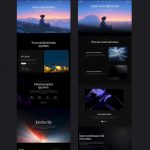
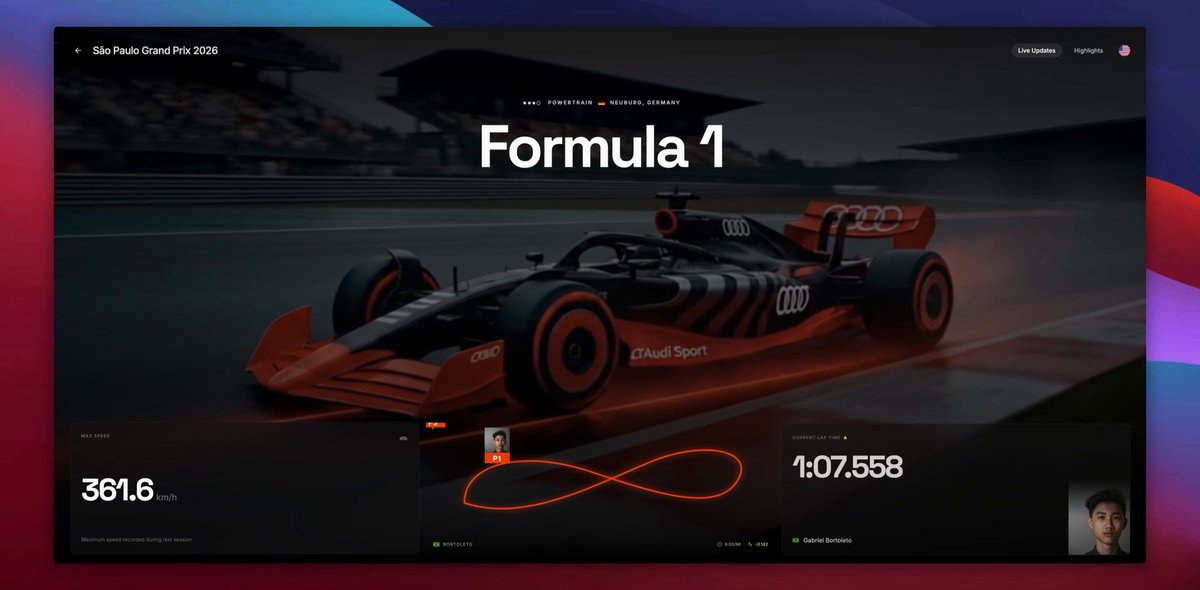
"使用 React、Tailwind CSS 和 Framer Motion 构建一个电影感、高端的 Formula 1 实时数据面板。设计应暗色、沉浸,并具有专业广播叠加层的感觉。

1. 布局与背景:
将背景设置为全屏、循环、静音的真实 F1 赛车在赛道上行驶的视频(使用此视频 URL:)。

在视频上叠加从顶部由黑色过渡到透明的深色渐变,并从底部加入红色径向渐变,模拟底部泛光效果。

使用深色主题(bg-[#0a0a0a])和白色文字。

导入并使用 Inter 作为标准文字字体,使用 Space Grotesk 作为大号展示数字和标题字体。

2. 页头与 Hero 区域:
顶部栏:加入返回箭头图标、标题“São Paulo Grand Prix 2026”,以及“Live Updates”和“Highlights”按钮,另加一个小型美国国旗图标。

中心 Hero:用超大粗体文字(text-[140px])展示“Formula 1”。在其上方加入一个小副标题,其中包含 Audi rings Logo(SVG)、“Powertrain”、一面德国国旗和“Neuburg, Germany”。使用 Framer Motion 让这些元素在加载时淡入并向上滑动。

3. 底部数据面板(网格布局):
在底部创建三个玻璃拟态面板(bg-[#111111]/60 backdrop-blur-xl border border-white/5):

面板 1(Max Speed):
标题:“MAX SPEED”
数值:创建一个自定义 React hook/组件,在 2.5 秒内让数字从 0 平滑递增到 372.5。旁边显示“km/h”。

副标题:“Maximum speed recorded during test session”。

面板 2(Live Track Map):
绘制一条代表 F1 赛道的自定义 SVG 路径。为路径添加红色/橙色描边以及带发光滤镜的效果。

添加三个车手标记(P1、P2、P3),使用 <animateMotion> 让它们持续沿 SVG 路径运动。

标记应包含一条指向赛道的短线、一个彩色方框和方框内一张很小的车手照片。
在地图下方显示车手详情:巴西国旗、“Bortoleto”、带时钟图标的“8:05/MI”,以及带活动图标的绿色“-0.142”。

面板 3(Current Lap Time):
标题:“CURRENT LAP TIME”,带绿色向上箭头。

数值:创建一个自定义 React 组件,让时间码快速递增,并在 3 秒后精确停在 1:11.310。

添加车手姓名“Gabriel Bortoleto”和一面巴西国旗。

在该面板右下角放置一张车手抠图,并使用 CSS mask([mask-image:linear-gradient(to_top,black_50%,transparent)])让其底部淡出。

4. 精修:
确保所有面板在页面加载时都以淡入和向上滑动的方式错开进入。

使用 lucide-react 作为图标(ArrowLeft、Clock、Activity)。

让布局完全响应式:移动端将底部面板纵向堆叠,桌面端并排放置。"

关于视频 URL 的说明:Prompt 中的 Streamable URL 包含过期 token。如果有人将来尝试构建而视频无法加载,可以把该 URL 替换为任何循环 MP4 视频链接(例如 Pixabay 视频),或者重新上传视频以获得新的链接!
原文提示词(English)
Prompt to build the F1 Dashboard:

"Build a cinematic, high-end Formula 1 live dashboard using React, Tailwind CSS, and Framer Motion. The design should be dark, immersive, and feel like a professional broadcast overlay.

1. Layout & Background:
Set the background to be a full-screen, looping, muted video of a realistic F1 car driving on a track (use this video URL: ).

Overlay the video with a dark gradient (black to transparent) from the top, and a red radial gradient from the bottom to simulate an underglow effect.

Use a dark theme (bg-[#0a0a0a]) with white text.

Import and use Inter for standard text and Space Grotesk for large display numbers and headers.

2. Header & Hero Section:
Top bar: Include a back arrow icon, the title 'São Paulo Grand Prix 2026', and buttons for 'Live Updates' and 'Highlights', plus a small US flag icon.

Center hero: Display 'Formula 1' in massive, bold text (text-[140px]). Above it, add a small subtitle with the Audi rings logo (SVG), 'Powertrain', a German flag, and 'Neuburg, Germany'. Animate these elements to fade and slide up on load using Framer Motion.

3. Bottom Data Panels (Grid Layout):
Create three glassmorphic panels at the bottom (bg-[#111111]/60 backdrop-blur-xl border border-white/5):
Panel 1 (Max Speed):
Title: 'MAX SPEED'
Value: Create a custom React hook/component that smoothly animates a number counting up from 0 to 372.5 over 2.5 seconds. Display 'km/h' next to it.

Subtitle: 'Maximum speed recorded during test session'.

Panel 2 (Live Track Map):
Draw a custom SVG path representing an F1 circuit. Give the path a red/orange stroke with a glowing filter effect.

Add three driver markers (P1, P2, P3) that continuously animate along the SVG path using <animateMotion>.

The markers should include a small line pointing to the track, a colored box, and a tiny driver photo inside the box.
Below the map, show driver details: a Brazilian flag, 'Bortoleto', a clock icon with '8:05/MI', and an activity icon with a green '-0.142'.

Panel 3 (Current Lap Time):
Title: 'CURRENT LAP TIME' with a green up arrow.

Value: Create a custom React component that animates a timecode rapidly ticking up before stopping at exactly 1:11.310 over 3 seconds.

Add the driver's name 'Gabriel Bortoleto' and a Brazilian flag.

In the bottom right corner of this panel, place a cutout image of a driver that fades out at the bottom using a CSS mask ([mask-image:linear-gradient(to_top,black_50%,transparent)]).

4. Polish:
Ensure all panels stagger their entrance animations (fade in and slide up) when the page loads.
Use lucide-react for icons (ArrowLeft, Clock, Activity).

Make the layout fully responsive, stacking the bottom panels on mobile and placing them side-by-side on desktop."

Note on the video URL: The Streamable URL in the prompt contains an expiration token. If someone tries to build this in the future and the video doesn't load, they can replace that URL with any looping MP4 video link (like a Pixabay video) or re-upload a video to get a fresh link!
建议模型
Gemini 3.1 · React · Framer Motion
视频地址
https://media.goodcase.ai/media/video/gemini-formula-1-5fb69c5e1530.mp4