














































提示词
我用一条提示在周末做出了这个价值 10,000 美元的网站……

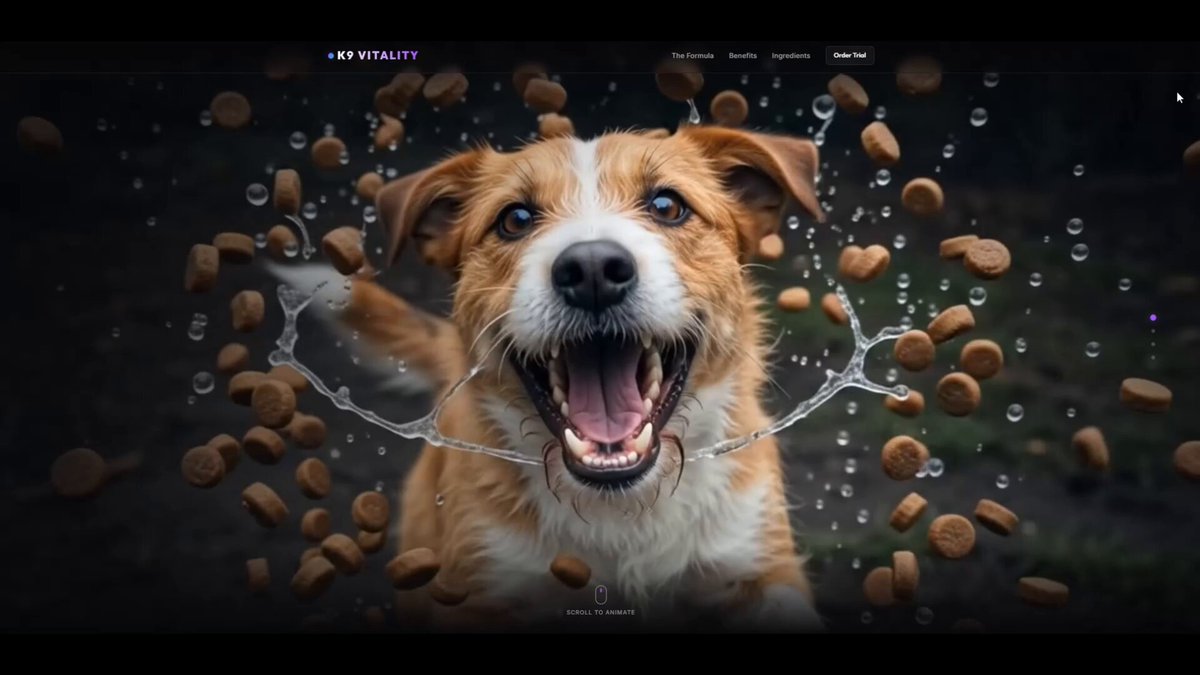
开玩笑的。我又做了一个网页模型,只是用一条主提示和几条小提示来调整它。

它主要花了我一些时间,以及每周 Antigravity 积分的大约 1%。

我从一张看到的图片中得到灵感,画面里一只流口水的狗把食物卷起;于是我决定把它变成一个动态网页概念。

我会继续发布各种随机想法,因为我几乎每天都会做出新东西。

和往常一样,我用 Gemini、Google Flow 和 Antigravity 完成了它。

最后,我让 Antigravity 写一条可复用的提示,用于再次创建这样一个平滑、由鼠标滚动驱动动画的网站 Hero 区域。

这是它给我的提示 ↓
---------------------------------------------------

我想用原生 HTML、CSS 和 JavaScript 构建一个高级的、由滚动驱动的帧动画,也就是滚动叙事式 Hero 区域。

图像帧位于名为 frames 的文件夹中,文件名从 frame_005.jpg 到 frame_181.jpg 依次编号(请替换为你的具体文件名和范围)。

请使用以下高性能前端机制实现,以确保体验丝滑流畅、响应式,并在加载或滚动时完全没有白闪:

1. HTML5 Canvas 覆盖式尺寸与 DPI 缩放:
   - 使用一个 HTML5 canvas 元素,并将其固定在 sticky 视口容器内(position: sticky; height: 100vh; top: 0;)。
   - 在 JS 中使用 window.devicePixelRatio 动态缩放 canvas 的宽度和高度,确保在高 DPI,也就是 Retina 屏幕上绘制清晰。
   - 在绘制循环中实现 cover 缩放坐标,让帧填满视口并居中裁切,行为类似 CSS 的 object-fit: cover。

2. 双队列渐进式资源预加载器:
   - 创建一个加载画面。为防止下载时页面卡死,将帧加载拆成两个队列:
     a) 优先队列:只预加载每第 5 帧(例如索引 5、10、15……181)。优先批次加载完成后,隐藏预加载画面并立即启动页面。
     b) 后台队列:启动后,以小批次异步加载剩余的中间帧(例如每批 4 帧、间隔 50 毫秒),避免堵塞浏览器网络。

3. 向外邻帧回退搜索:
   - 滚动时,如果渲染循环请求的帧索引尚未下载完成,就在图像缓存数组中向外搜索(检查索引 -1、索引 +1、索引 -2、索引 +2,依此类推),并绘制距离最近的已加载帧。这能确保初次滚动时体验流畅,不出现视觉闪烁或黑帧。

4. 线性插值,也就是滚动 lerp:
   - 根据滚动进度跟踪 targetFrame,并使用单独的浮点数 currentFrame,让它在 requestAnimationFrame 循环中平滑地靠近 targetFrame。
   - 使用线性插值,也就是 lerp:currentFrame += (targetFrame - currentFrame) * 0.08(可调整系数来改变滑动速度)。
   - 只有当差值大于 0.001 时才触发 canvas 绘制,以便用户停止滚动时减少 CPU 使用。

5. 响应式设计与玻璃拟态叠加层:
   - 叠加结构化的文字叙事卡片,让它们在特定滚动范围内淡入或淡出。
   - 在右侧构建垂直滚动进度时间线指示器点阵,突出显示当前版块,并支持点击后平滑滚动到对应版块。
原文提示词(English)
I made this $10,000 website with one prompt over the weekend…

Just joking. I made another mock-up webpage for fun using one main prompt and a few smaller prompts to adjust it.

It mostly cost me some time and about 1% of my weekly Antigravity credits.

I got the idea for the salivating dog swirling up its food from an image I saw, and I decided to turn it into an animated web concept.

I am going to keep posting random ideas like this because I make something new almost every day.

As usual, I created it with Gemini, Google Flow, and Antigravity.

At the end, I asked Antigravity to write a reusable prompt for creating a smooth, mouse-scroll-animated website hero section like this again.

Here is the prompt it gave me ↓
---------------------------------------------------

I want to build a premium, scroll-driven frame animation (scrollytelling) hero section in vanilla HTML, CSS, and JavaScript.

The image frames are located in a folder named 'frames' and are numbered sequentially from 'frame_005.jpg' to 'frame_181.jpg' (replace with your specific file names and range).

Please implement this using the following high-performance frontend mechanics to ensure it is buttery-smooth, responsive, and has zero white flashes on loading/scrolling:

1. HTML5 Canvas Cover Sizing & DPI Scaling:
   - Use an HTML5 `<canvas>` element pinned inside a sticky viewport container (`position: sticky; height: 100vh; top: 0;`).
   - Dynamically scale the canvas width and height in JS using `window.devicePixelRatio` to keep drawings crisp on high-DPI (Retina) screens.
   - Implement "cover" scaling coordinates inside the drawing loop so the frames fill the viewport and crop centered, behaving like CSS `object-fit: cover`.

2. Double-Queue Progressive Asset Preloader:
   - Create a loading screen. To prevent the page from locking up on download, split frame loading into two queues:
     a) Priority Queue: Preload only every 5th frame (e.g., index 5, 10, 15, ..., 181). Once this priority batch is loaded, hide the preloader screen and launch the page instantly.
     b) Background Queue: After launching, load the remaining intermediate frames asynchronously in small batches (e.g., batches of 4 with a 50ms delay) to avoid choking the browser network.

3. Outward Neighbor Fallback Search:
   - While scrolling, if the render loop requests a frame index that hasn't finished downloading yet, search the image cache array outward (check index-1, index+1, index-2, index+2, etc.) and draw the closest available loaded frame. This guarantees a fluid experience with zero visual flashing or black frames during initial scrolls.

4. Linear Interpolation (Scroll Lerping):
   - Track `targetFrame` based on scroll progress, and use a separate float `currentFrame` that smoothly glides toward `targetFrame` in a `requestAnimationFrame` loop.
   - Use linear interpolation (lerp): `currentFrame += (targetFrame - currentFrame) * 0.08` (tweak coefficient for slide speed).
   - Only trigger canvas draws when the difference is greater than 0.001 to minimize CPU usage when the user stops scrolling.

5. Responsive Design & Glassmorphic Overlays:
   - Overlay structured text narrative cards that fade in/out at specific scroll ranges.
   - Build a vertical scroll progress timeline indicator dot grid on the right side that highlights the active section and scrolls to it smoothly on click.
建议模型
Gemini AntiGravity / GPT-5.6 Sol
视频地址